
yoshioka
Participant
Participant
Dec 15, 2023 7:16 PM UTC
Solved

Downloading Smart Recording content

Greetings fellows Zoomies!

Not sure if this has been discussed before but the AI Companion Smart recordings are a game changer for staff tasked with creating minutes from meetings as well as students and faculty conducting research interviews on Zoom.  The Smart recording content, however, is not one of the components that can be downloaded from the cloud recording like the video and the transcript.  Is Zoom going to add that functionality?

Thanks,

Ken

YaBoiB
YaBoiBAnswer
Employee
Dec 15, 2023 8:11 PM UTC

Hello @yoshioka, 


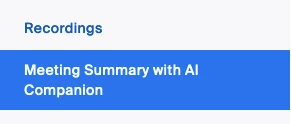
 I completely agree with you that the AI companion Smart recordings are a game changer. It has helped my productivity 10 fold since it was released to Zoomies internally. To answer your question, the meetings summary with AI companion has its own tab on the left side of your web UI profile. Just below your recordings tab. I will paste a screenshot for assistance. You can share and edit your summaries there if you so choose. 


We also have a KB article in our support page that is a helpful resource. 


Please click the accept solution button if my response was helpful. 


14 replies

YaBoiB
Employee
YaBoiBAnswer
Employee
Dec 15, 2023 8:11 PM UTC

Hello @yoshioka, 


 I completely agree with you that the AI companion Smart recordings are a game changer. It has helped my productivity 10 fold since it was released to Zoomies internally. To answer your question, the meetings summary with AI companion has its own tab on the left side of your web UI profile. Just below your recordings tab. I will paste a screenshot for assistance. You can share and edit your summaries there if you so choose. 


We also have a KB article in our support page that is a helpful resource. 


Please click the accept solution button if my response was helpful. 


Translate
Explorer
Sep 11, 2025 1:29 PM UTC

The text in the AI Summary is NOT the same as the text under each Smart Chapter. So it doesn't work if you want to use smart chapter time stamps - they're not equivalent.


Please mark this UNRESOLVED again and let's get an answer!!!

Translate
Explorer
Dec 21, 2023 10:33 PM UTC

That handles getting at and sharing the summary. How about the smart chapters recordings? Any solution on sharing that? Or downloading it?


Translate
YaBoiB
Employee
Employee
Dec 22, 2023 5:38 PM UTC

Hello @DorothyE , 


 I apologize; I am not familiar with what you are talking about. Can you explain what you mean? 


Translate
Partner
Dec 26, 2023 3:29 PM UTC

please try the following:


Using Smart Recording with AI Companion

Copy the smart chapter overview to share with others
On the recording, click Chapters Overview.
At the top of the dialog, click the copy icon to copy the text to your clipboard.
Click Close.
Share the text as necessary by pasting it, such as in an email.

https://support.zoom.com/hc/en/article?id=zm_kb&sysparm_article=KB0061101


Did my response answer your question? If so, please don't forget to mark the reply as an accepted solution.


thanks,  eliot

Translate
Explorer
Jan 30, 2024 9:13 PM UTC

Sharing the text by sections is pretty easy.. What we were looking for is the ability to have the VIDEO download by chapter


Translate
Explorer
May 10, 2024 10:38 AM UTC

Has this changed since original answers? I see the Summary and the Smart Chapters. There is a copy option for the Summary but there is no Smart Chapters Overview. This means that I would have to copy and paste the text produced in relation to each Smart Chapter. Am I missing something?

Translate
Newcomer
Jun 13, 2024 8:42 AM UTC

I'm starting to think I am going crazy - I can't find it either.

Don't want to have to copy and paste each chapter, timestamp and notes.  

Translate
yoshioka
Participant
yoshiokaAuthor
Participant
Jun 13, 2024 4:53 PM UTC

Thanks for all of the responses to my inquiry!  The Meeting Summary is easy to copy and paste into a Word document but in the Smart Recording, you need to copy and paste the main summary, each chapter summary and next steps into a document.  What I was wondering about is if Zoom will eventually have a download option to download the entire Smart Recording document as one file, just like the video, audio and the transcript.

Translate
Newcomer
Aug 13, 2024 7:29 PM UTC

Exactly, this would be a big step forward.  In the meantime, Otter.ai currently has a summary feature that generates chapter summaries live while an event/meeting is in process that can also be edited later (edits also improve the AI).  The summary feature is included in the freemium version.  See feature details here:

https://help.otter.ai/hc/en-us/articles/5093383818263-Automated-Live-Summary-Overview


Hopefully Zoom sorts this out soon so we'll no longer need multiple vendors/platforms to capture this content locally.

Translate
yoshioka
Participant
yoshiokaAuthor
Participant
Jan 9, 2025 4:34 PM UTC

@jmathias-You are right-I also saw Eliot's response and I also do not see a button for chapter overview and as a Zoom admin, I didn't see any options to enable chapter overview for ther smart recordings.  Unsure who gets access to that or how to enable it in our ccount.

Translate
Newcomer
Aug 22, 2025 9:32 PM UTC

The ability to easily copy chapter summaries either as a whole or individually really needs to be implemented.  You used to be able to go to each highlight and drag and copy directly.  Not a great solution, but it worked.  Now you can't even select the Highlighted chapter, you have to go to edit the chapter highlight and copy the Head and the body separately.  Seems very easy to implement an action to simply download all of the smart chapter titles and summaries.  C'mon Zoom.  This is remedial functionality.  Make it happen!

Translate