Explorer
Aug 16, 2021 8:27 AM UTC
Solved

Participant videos freezing

I have used Zoom for over 19 months with no issue. Suddenly, in the last 3 weeks, my clients videos are freezing, I can hear them but can't see them. They can see and hear me. I have tested the internet connection speed and have done the check from multiple locations. I have a feeling this started after my last software update. Anyone else experiencing the same? BTW this is happening with multiple groups of clients. 


Thanks!

    VA11_2
    VA11_2Answer
    Community Manager
    Aug 19, 2021 5:40 PM UTC

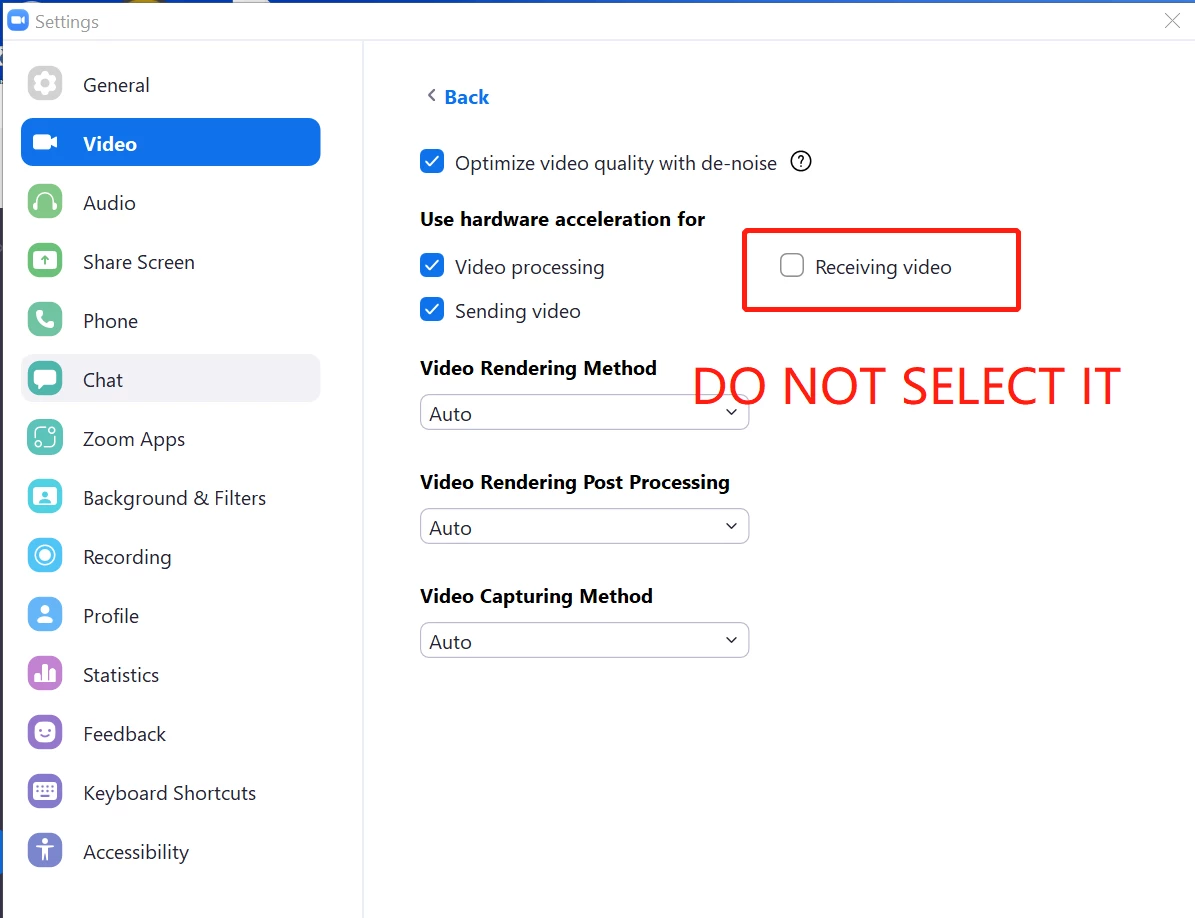
    Hi @CN88_2 Please try adjusting the video settings in Zoom Client -> Settings -> Video -> Advanced -> Uncheck Receiving Video in the section (Use hardware acceleration for), and see if this solves the issue. 

    75 replies

    VA11_2
    Community Manager
    VA11_2Answer
    Community Manager
    Aug 19, 2021 5:40 PM UTC

    Hi @CN88_2 Please try adjusting the video settings in Zoom Client -> Settings -> Video -> Advanced -> Uncheck Receiving Video in the section (Use hardware acceleration for), and see if this solves the issue. 

    Translate
    Newcomer
    Aug 20, 2021 12:12 AM UTC

    Thank you for the advise4 - it worked and  I had no problems today in the group meeting 🙂 🙂

    Translate
    Newcomer
    Aug 24, 2021 9:40 PM UTC

    On my computer the problem is only in one-to-one sessions not in the group ones. Have you tried one-to-one after following the advice? I am going  tomorrow

    Translate
    Newcomer
    Aug 23, 2021 3:08 PM UTC

    I'm facing the same problem here! I'll try your tips"

    Thanks!

    Translate
    Newcomer
    Aug 23, 2021 6:12 PM UTC

    Thank you for the tip.  I will try it today.  Fingers, toes, and eyes crossed.  

    Translate
    Newcomer
    Aug 24, 2021 8:02 PM UTC

    Exactly the same thing here, both on my HP desktop and my HP laptop.  I can briefly unfreeze the other client's videos by changing from gallery view to speaker view, or back again.  I will  try this solution and post again with results.

    Translate
    Newcomer
    Aug 25, 2021 12:47 AM UTC

    Yes! Finally! This very thing is happening to me! Is there a fix???


    Translate
    Newcomer
    Aug 25, 2021 4:28 AM UTC

    See above for fix - follow the step and it works for groups and individuals


    Translate
    Newcomer
    Aug 25, 2021 1:21 AM UTC

    You would think that with so many folks having this very same issue that Zoom would fix it!!! Come on Zoom, I am paying good money! 


    Translate
    Explorer
    Aug 30, 2021 11:54 PM UTC

    if you are paying good money, zoom offers you support, i'm fairly certain.  i have the free set-up, so i get no help, except for here.


    Translate
    Newcomer
    Aug 26, 2021 10:56 AM UTC

    Hi i have followed the instructions for the fix. It is better in that it is not constantly freezing, with me having to unfreeze throughout the meeting. However it will now pause audio and video it will start again on its own but there is then a delay and miss some of what is said.  Any advice for this please

    Translate
    Newcomer
    Aug 28, 2021 8:58 PM UTC

    Exact same issue for me too! Only over the past 3 weeks. To survive my meetings, I've been changing the view from "speaker" to "gallery" and it will unfreeze their video, but only for 1-3 minutes. Sooo frustrating.

    Translate
    Explorer
    Sep 3, 2021 3:23 AM UTC

    Try the solution, it worked for me.

    Translate
    Explorer
    Aug 30, 2021 12:49 AM UTC

    did the recommended solution work for you? i'm in the process of working with DELL. i need help.  

    Translate
    Newcomer
    Aug 30, 2021 7:37 PM UTC

    The same thing is happening to me.  It started about 4 weeks ago.

    Translate
    Explorer
    Aug 30, 2021 11:52 PM UTC

    yep.  have tried everything. dell was going to replace my motherboard on a 6th-month old computer.  i hope the suggested setting change helps.  i'll find out tomorrow when i go to work! And...it worked!

    Translate