Explorer
Aug 16, 2021 8:27 AM UTC
Solved

Participant videos freezing

I have used Zoom for over 19 months with no issue. Suddenly, in the last 3 weeks, my clients videos are freezing, I can hear them but can't see them. They can see and hear me. I have tested the internet connection speed and have done the check from multiple locations. I have a feeling this started after my last software update. Anyone else experiencing the same? BTW this is happening with multiple groups of clients. 


Thanks!

    VA11_2
    VA11_2Answer
    Community Manager
    Aug 19, 2021 5:40 PM UTC

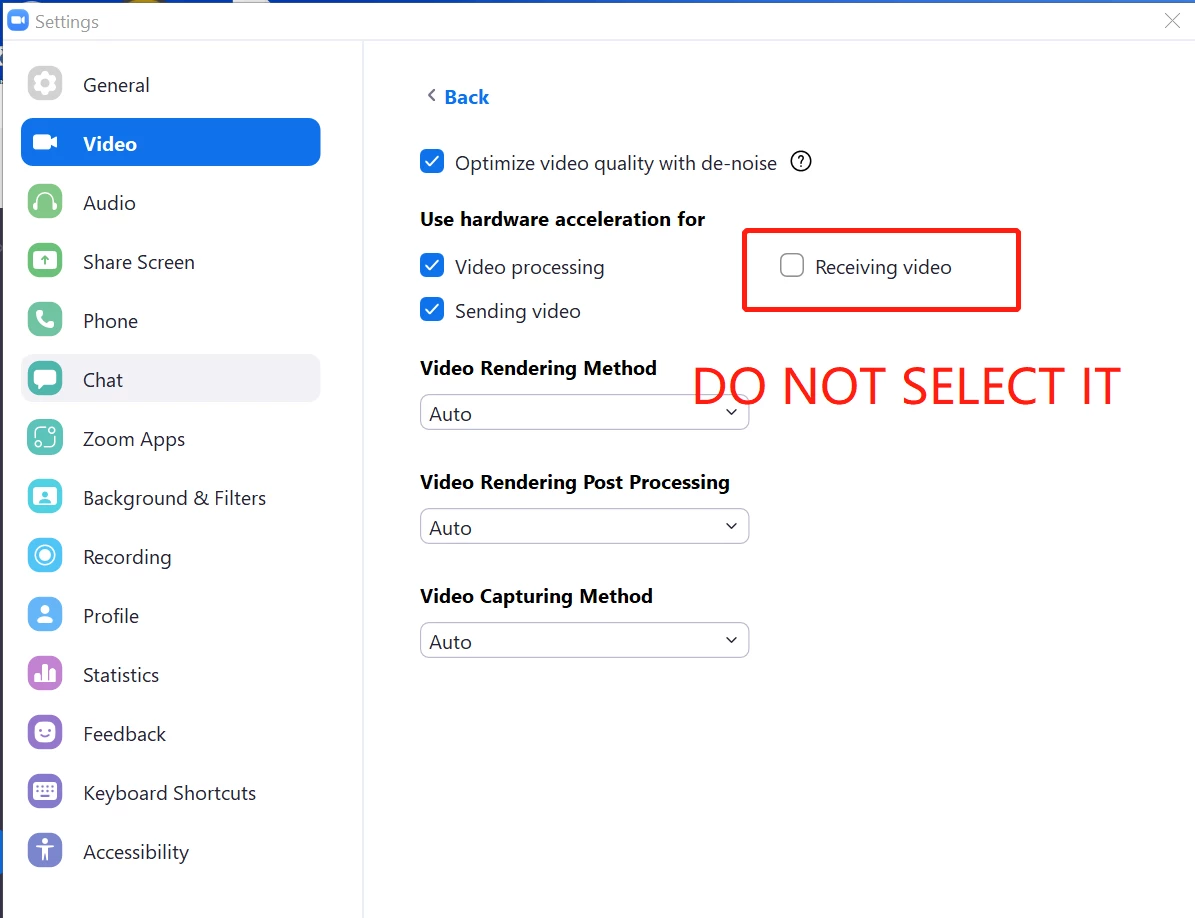
    Hi @CN88_2 Please try adjusting the video settings in Zoom Client -> Settings -> Video -> Advanced -> Uncheck Receiving Video in the section (Use hardware acceleration for), and see if this solves the issue. 

    75 replies

    Nafi
    Partner
    Partner
    Aug 16, 2021 9:10 AM UTC

    Hi CN, 

    I suggest to uninstall your zoom app first then fresh install new one from https://zoom.us/download for this kind of problems.


    Translate
    CN88_2Author
    Explorer
    Aug 16, 2021 10:12 AM UTC

    Thanks for the suggestion. I've done that and will test again. 


    Translate
    Newcomer
    Aug 16, 2021 10:06 AM UTC

    Beste CN


    Ik heb hetzelfde probleem, heeft opnieuw installeren geholpen?


    Met vriendelijke groet,

    Marya


    Translate
    Newcomer
    Aug 16, 2021 10:06 AM UTC

    geholpen bedoel ik uiteraard.

    Translate
    Newcomer
    Aug 16, 2021 2:45 PM UTC

    I am facing exactly same issue. Can Zoom team help on this?

    I tried to install new versions but problem still have.

    I am using Zoom on Windows 10

    Translate
    Explorer
    Jan 26, 2022 8:15 AM UTC

    me too!! I have uninstalled and installed several times to no avail and requested a help ticket but no reply

    Translate
    Newcomer
    Aug 17, 2021 3:38 PM UTC

    Same here...using Zoom for more than a year and now suddenly this start to happen for about a month or so. Reinstalled the app but that didn't help. It's super annoying! No such problems at all at Google Meet. So my bandwidth is ok.

    Translate
    Newcomer
    Aug 18, 2021 6:24 AM UTC

    This is happening for me too.

    Translate
    Newcomer
    Aug 18, 2021 6:37 AM UTC

    Yes me too. Only recently. A fresh install has not helped. Windows and drivers have been completely updated. I've tried multiple Zoom accounts, various users at the other end of the Zoom call and a variety of webcam/microphone setups. Every Zoom meeting will have users freeze randomly throughout the meeting.

    Translate
    Newcomer
    Aug 19, 2021 6:52 AM UTC

    Has anyone got a solution yet? I've gone through all the steps as suggested but problem still exists. As a short term measure I have to repeatedly click on 'view', change it and the participants remain unfrozen for a short period of time. The only common denominator is none of my participants have downloaded the latest version of Zoom. 


    Translate
    CN88_2Author
    Explorer
    Aug 19, 2021 11:11 AM UTC

    No solution yet...at least one that works! I've been using my mobile phone to conduct the meetings and client videos are not freezing. However this is not ideal as I need to see my clients on a big screen. 


    No word from the Zoom team!

    Translate
    Newcomer
    Aug 19, 2021 2:09 PM UTC

    i am experiencing the same over the last few weeks. i have learnt i can unfreeze by clicking the dots then the image but this only lasts for a while then freezes again. find i am constantly doing this throughout meetings. have uninstalled and reinstalled no difference! Is this due to a recent update by zoom?

    Translate
    Newcomer
    Aug 19, 2021 2:23 PM UTC

    I am having the same issue - any word from Zoom?


    Translate
    Newcomer
    Aug 25, 2021 1:36 AM UTC

    I tried the Zoom suggested fix and it seems to have worked perfectly.


    Translate
    Newcomer
    Aug 25, 2021 3:58 AM UTC

    Will try it tomorrow.... did yours work on one on one meeting or group Zoom meeting?

    Translate