

Elevate Your Zoom Experience: Introducing AI-Generated Virtual Backgrounds! | Community
Skip to main content
Employee
July 30, 2024

Elevate Your Zoom Experience: Introducing AI-Generated Virtual Backgrounds!
  • July 30, 2024
  • 4 replies
  • 0 views


Hey Zoom Community!

We're thrilled to introduce our latest update: AI-generated Virtual Backgrounds! 🌟 Now, creating the perfect backdrop for your Zoom calls has never been easier.

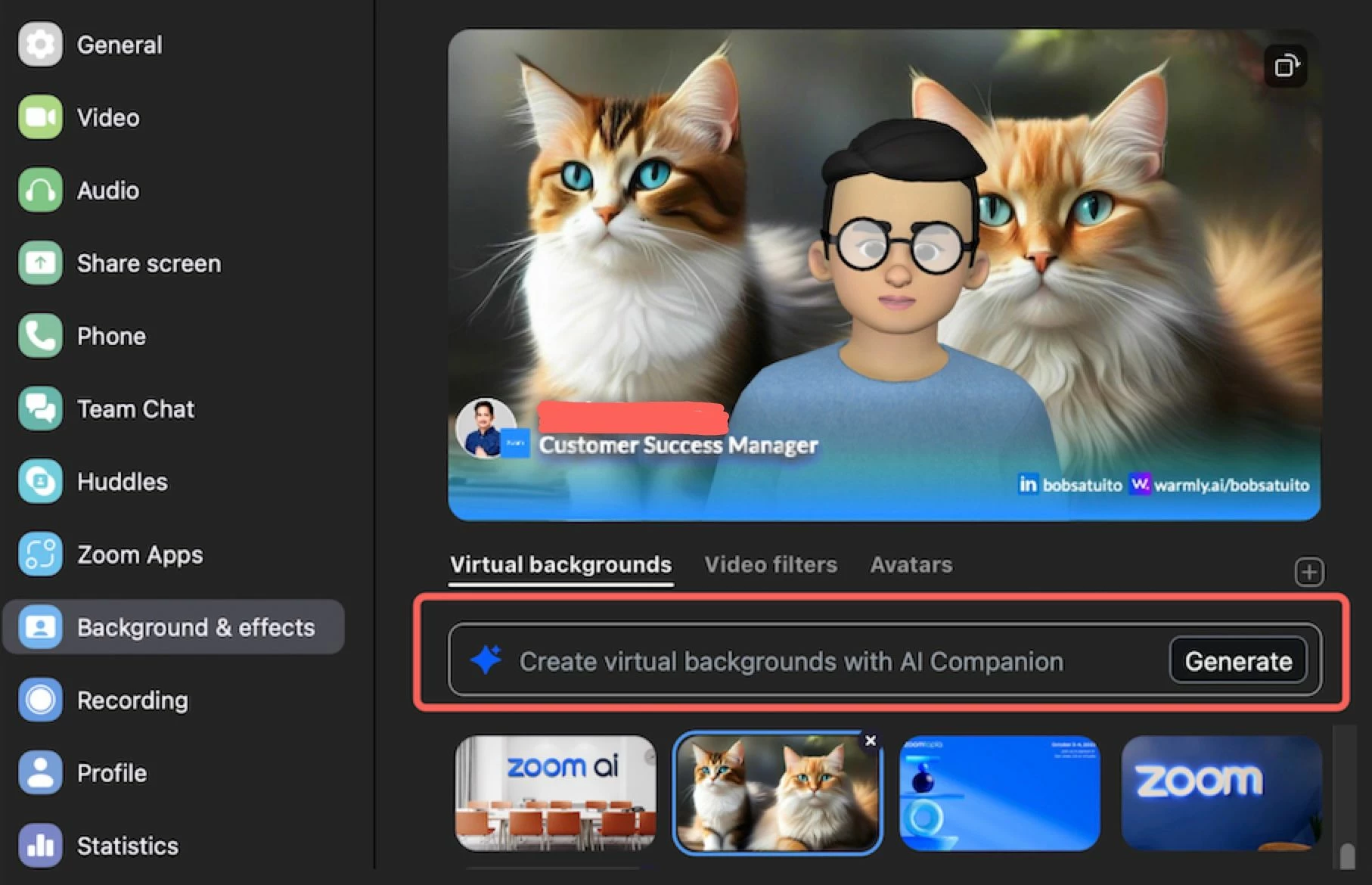
Here's how it works: Within the virtual background selection window, eligible users can now access the generate custom background feature. Simply choose from preset options or describe the background you envision, and our AI model will work its magic to bring your vision to life! 🎨✨

Whether you're dreaming of a serene beach scene, a bustling cityscape, or something totally out-of-this-world, our AI-generated backgrounds have got you covered. Plus, with multiple images to choose from, you're sure to find the perfect fit for any occasion.

But that's not all! Admins can also manage this feature through account and group-level settings, ensuring seamless integration into your organization's Zoom experience. 💼✨

So, why wait? Try out our AI-generated Virtual Backgrounds today and elevate your Zoom calls to a whole new level of creativity and professionalism! 

Background & Effects> Virtual Backgrounds> Generate


Concerned about how Zoom AI Companion features handle your data?  Please refer to this comprehensive guide for more information.


4 replies

Bri
Community Manager
Community Manager
July 31, 2024

Love this! I've been needing a new virtual background anyway 😍 


Thanks for sharing @iambobsat 🤝

Partner
August 6, 2024

thats great i was looking for that 

Newcomer
January 24, 2025

Is there a way to download this AI generated image to my desktop?  I love the image that was generated for me and want to use it in other places.

iambobsatAuthor
Employee
May 29, 2025

Hi JustinBSpokane, 


This AI generated background image can only be saved and used as background image for meetings and cannot be saved through your desktop.


Newcomer
May 29, 2025

Is there no clarification available on who is eligible, or why?

iambobsatAuthor
Employee
May 29, 2025

Hi ArgoTMP, 


Please see below:


1. Zoom Account Type

AI-generated virtual backgrounds are available to users on the following paid plans:

  • Pro

  • Business

  • Enterprise

    If you're on a free (Basic) plan, this feature isn't accessible.


    2. Zoom Workplace App Version

    Ensure you're using Zoom Workplace app version 6.0.0 or higher to access AI-generated virtual backgrounds. 


    3. System Requirements

    Your device must meet the system requirements for virtual backgrounds without a green screen. This includes specific operating systems and processor capabilities. 

  •  

  •  

Newcomer
December 22, 2025

I meet all the requirements: Workplace Pro edition, and version 6.6.6, and I even have the setting for "AI generated virtual backgrounds" toggled to on. Yet I have no "Generate" button!!