Newcomer
March 13, 2025
Solved

Setting Up Paid registration for a webinar

I have paid for the Events subscription & connected my business and PAYPAL and it is still NOT coming up with the option to set up for a PAID TICKET in registration - any advice ? 

    Ray_Harwood
    Partner
    September 24, 2025

    Welcome to the Zoom Community, @SDlifestyle.


    Your Zoom Events or Webinars Plus Hub is integral to your event success. All events exist within a Hub, and some things – like paid registration payout – are hub-level items. Here’s where you should look:

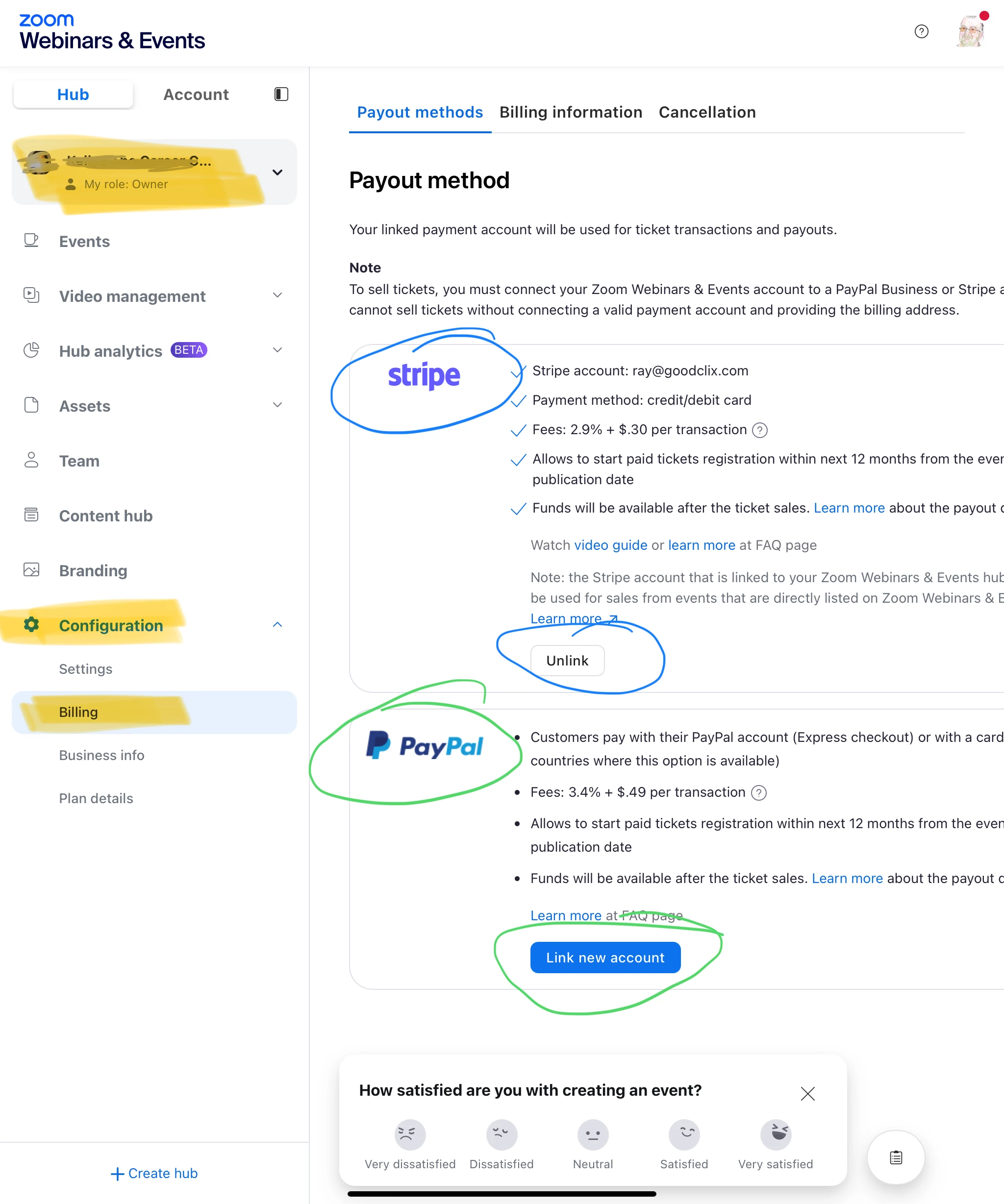
    Make sure you have the Hub selected – don’t go into the event. Go to Configuration > Billing. PayPal is highlighted in green. I’ve used Stripe, which you can tell by the “Unlink” button – highlighted blue.


    If none of this makes sense to you, let me know and I’ll point you to some resources on learning more about the Zoom Events product line and how it works. 

    4 replies

    Ray_Harwood
    Partner
    Partner
    March 30, 2025

    Welcome to the Zoom Community, @EmmaPark.  Sorry for not seeing your post earlier.


    Are you still having issues getting Paid tickets set up?  Have you referenced this Zoom Support article?

    https://support.zoom.com/hc/en/article?id=zm_kb&sysparm_article=KB0066886

    If you’re still having issues, let me know here and I’ll try to help. 

    Translate
    Newcomer
    September 24, 2025

    I have a similar issue as Emma. I have a paid webinar and events account, and nowhere do I see a place to add payment processor info or anything relating to setting up paid events. The zoom support article linked above talks about going to Zoom Hubs -- what even is that? I don't need a hub, I just need to have people pay to register. 

    Translate
    Ray_Harwood
    Partner
    Partner
    September 24, 2025

    Welcome to the Zoom Community, @SDlifestyle.


    Your Zoom Events or Webinars Plus Hub is integral to your event success. All events exist within a Hub, and some things – like paid registration payout – are hub-level items. Here’s where you should look:

    Make sure you have the Hub selected – don’t go into the event. Go to Configuration > Billing. PayPal is highlighted in green. I’ve used Stripe, which you can tell by the “Unlink” button – highlighted blue.


    If none of this makes sense to you, let me know and I’ll point you to some resources on learning more about the Zoom Events product line and how it works. 

    Translate
    Explorer
    July 8, 2025

    hi @Ray_Harwood I have a similar issue - i have linked Stripe and i also cannot get a 'Paid' ticket option.  Only free is available.  

    My event is a two day virtual Conference. 

    Translate