Newcomer
Jul 7, 2022 7:25 PM UTC
Solved

Re-invite Panelists

I have scheduled a webinar with panelists. Then I changed the date/time of the webinar. The panelists have not received an updated panelist email. How do I re-invite existing panelists? 

The discussion "Panelists invites" says that panelists will automatically receive an updated invitation if the date/time change, but this has not happened. 



    YaBoiB
    YaBoiBAnswer
    Employee
    Jul 7, 2022 7:52 PM UTC

    Hello @FTCEnv, 


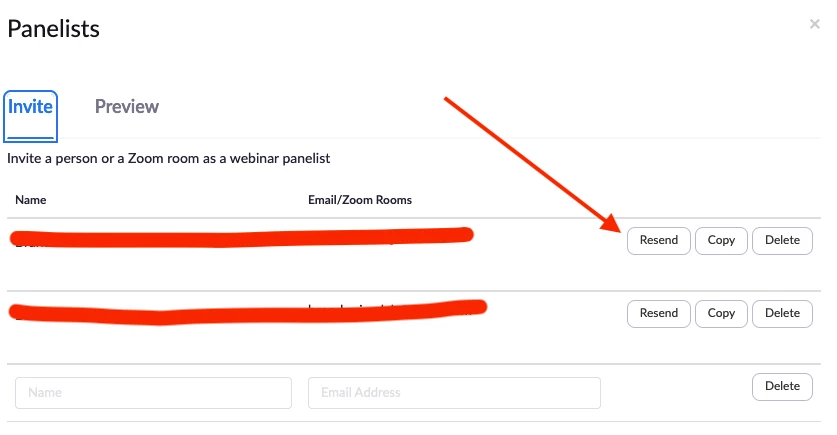
     Did you change the date and time in the Calendar Event or on the Zoom Webinar portal? If you click into the Webinar and then at the bottom of the page click manage appearance, there is an Invite button there. You can resend to your panelists. Screenshot below from test account. 


    Thanks, 

    Brandon


    1 reply

    YaBoiB
    Employee
    YaBoiBAnswer
    Employee
    Jul 7, 2022 7:52 PM UTC

    Hello @FTCEnv, 


     Did you change the date and time in the Calendar Event or on the Zoom Webinar portal? If you click into the Webinar and then at the bottom of the page click manage appearance, there is an Invite button there. You can resend to your panelists. Screenshot below from test account. 


    Thanks, 

    Brandon


    Translate