Newcomer
Sep 6, 2023 10:15 PM UTC
Solved

Enabling attendees cameras in webinar breakout rooms

How to I enable attendees to turn on their camera in a webinar breakout room? Attendees can unmute in breakout rooms but I'm not sure how to give them access to share their camera in their breakout rooms. 

    Ray_Harwood
    Partner
    Sep 7, 2023 2:29 AM UTC

    Welcome to the Zoom Community, @dsinger.


    Well, you stumped me -- temporarily.


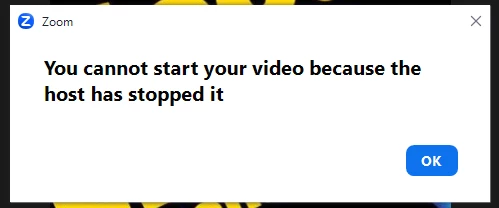
    I first thought, "Well, the Support article says people will have the same access to unmute and start video as they would in a meeting, so they can just do it."  I created a test webinar and tried it... and I was wrong.  Each time an attendee clicked the Start Video button, this message popped up:
     

    And it took me several minutes to discover the "trick".  I looked everywhere for a menu option to "Allow Attendees in Breakout Rooms to start video" with no luck.  Then my eyes landed on the Participants window with the ... menu expanded:
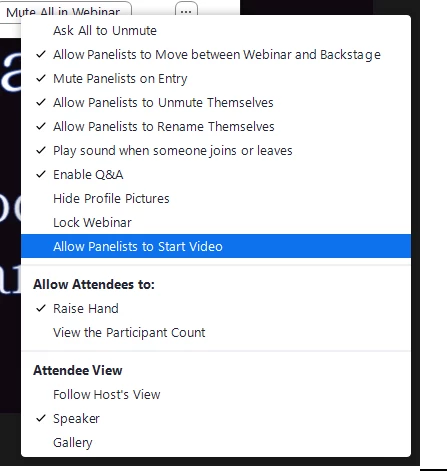
    I enabled Allow Panelists to Start Video, and then when an attendee clicked Start Video, it worked.


    So a lot depends on whether the host initially has the Allow Panelists to Start Video set to enabled.  If so, no action is required.  If not, or if you get complaints about the pop-up error message above, check it and enable it.

    2 replies

    Ray_Harwood
    Partner
    Partner
    Sep 7, 2023 2:29 AM UTC

    Welcome to the Zoom Community, @dsinger.


    Well, you stumped me -- temporarily.


    I first thought, "Well, the Support article says people will have the same access to unmute and start video as they would in a meeting, so they can just do it."  I created a test webinar and tried it... and I was wrong.  Each time an attendee clicked the Start Video button, this message popped up:


    And it took me several minutes to discover the "trick".  I looked everywhere for a menu option to "Allow Attendees in Breakout Rooms to start video" with no luck.  Then my eyes landed on the Participants window with the ... menu expanded:

    I enabled Allow Panelists to Start Video, and then when an attendee clicked Start Video, it worked.


    So a lot depends on whether the host initially has the Allow Panelists to Start Video set to enabled.  If so, no action is required.  If not, or if you get complaints about the pop-up error message above, check it and enable it.

    Translate
    Explorer
    Mar 19, 2024 7:39 PM UTC

    this is amazing and so helpful. I am in a practice test and clicked on participants and didn't see those options, can you tell me how you got that?

    Translate