
Explorer
Jul 25, 2023 8:16 AM UTC
Question

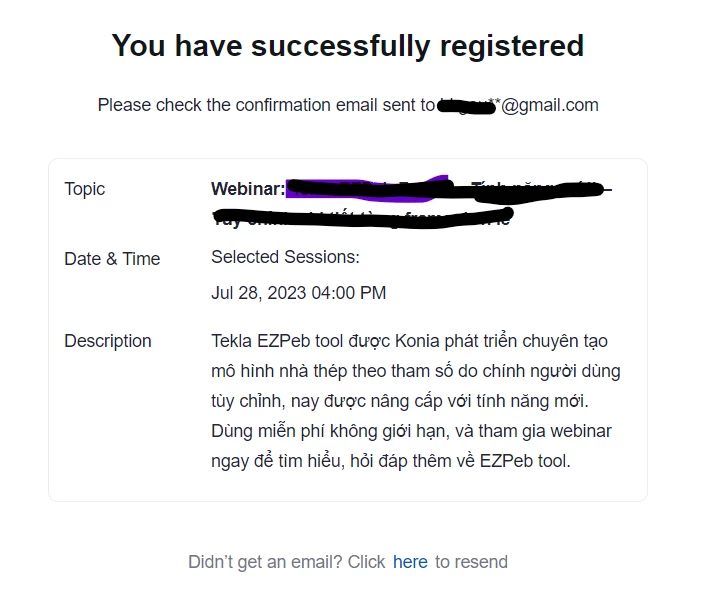
Don't receive any Webinar confirmation email after registration

Even though I've successfully registered, I didn't receive any confirmation email for the webinar. 


    9 replies

    Newcomer
    Jul 26, 2023 1:16 PM UTC

    What was the final fix for this it’s happening to me as well thank you 

    Translate
    Explorer
    Aug 12, 2023 11:01 PM UTC

    I use Windows 10 and have the same problem that just started happening with one of the webinars I subscribe to.  They say the problem is with zoom as they can see I have registered but I am not getting the zoom link unless I re-register at the time of the webinar.  It looks to me like no one from zoom support cares since I don't see any responses to the above  requests

    Translate
    Librarycat
    Partner
    Partner
    Aug 13, 2023 4:20 PM UTC

    The host needs to make sure they have chosen to actually send a confirmation email when they set up the Webinar. Host needs to look under "Email Settings" under the Webinar


    Translate
    ElleyAuthor
    Explorer
    Aug 14, 2023 7:03 AM UTC

    I'm also the host.

    Translate
    Librarycat
    Partner
    Partner
    Aug 14, 2023 11:42 PM UTC

    Are you also the admin of the Zoom account? You can go into the admin Webinar settings to make sure you actually have a confirmation email turned on.

    Translate
    ElleyAuthor
    Explorer
    Aug 14, 2023 7:02 AM UTC

    I also sent this question to Zoom support email.

    Zoom-Support responded me with some solutions but nothing works (those solutions are weird...hm... like: adding email to "Add user", asking customers if they block Zoom...).

    I asked them to try registering that webinar to see if they also got the same problem but they didn't. hehe. 

    Still no proper answer so far. 

    Translate
    Explorer
    Dec 19, 2023 2:28 AM UTC

    Sorry I just now logged in here with another problem.   It isn't fixed with the 2 groups I was talking about then.  I uninstalled Zoom and reinstalled it and it didn't fix the problem with just those 2 groups.  Has worked fine with other groups

    Translate
