Explorer
Jan 14, 2022 4:05 PM UTC
Solved

Can chat be disabled in Zoom Webinar?

I want to have a training event using Zoom Webinar where attendees can only ask questions via the Q & A option and not in chat. I want to disable chat to prevent private conversations amongst the attendees during the event.  Is this possible and if so, how do I do that?

    Dan_ZoomSE
    Employee
    Jan 14, 2022 4:25 PM UTC

    Hello @CLynch39,


    Absolutely!  


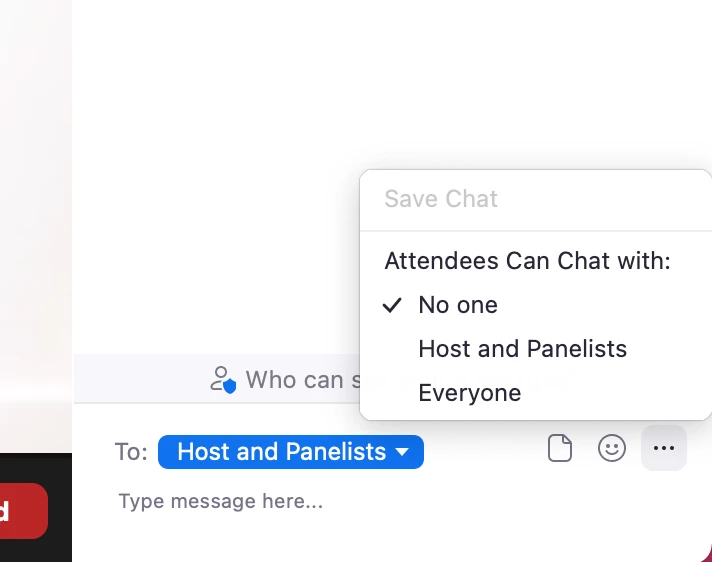
    Once you start the Webinar, open chat, click the three dots in the bottom right and you can choose how chat will work for Attendees.


    If this has answered your question, please click the Accept as Solution button below so that others in the Community may benefit as well.

    Thanks!


    9 replies

    Dan_ZoomSE
    Employee
    Employee
    Jan 14, 2022 4:25 PM UTC

    Hello @CLynch39,


    Absolutely!  


    Once you start the Webinar, open chat, click the three dots in the bottom right and you can choose how chat will work for Attendees.


    If this has answered your question, please click the Accept as Solution button below so that others in the Community may benefit as well.

    Thanks!


    Translate
    CLynch39Author
    Explorer
    Jan 14, 2022 4:49 PM UTC

    Thanks very much!

    Translate
    Explorer
    Jan 21, 2022 2:51 PM UTC

    That is good info.  Is there a setting that Admin can set for chat to be only to host and co-host


    Translate
    Dan_ZoomSE
    Employee
    Employee
    Jan 21, 2022 2:56 PM UTC

    No, you cannot restrict to just host/co-host, all other Panelists would be able to chat with each other as well.  But the Host and Co-Host could send private messages to each other.  If host and cohost need to chat but they do not want anyone else to be able to, then I would recommend that the Host and Co-Host use Zoom IM (outside of the webinar).


    If this has answered your question, please click the Accept as Solution button below so that others in the Community may benefit as well.

    Thanks!

    Translate
    Explorer
    Jul 12, 2022 9:08 PM UTC

    When the in-webinar chat is set to "no one," can hosts and panelists still use the chat to send to just each other or does the "no one" apply to them as well?

    Translate
    Explorer
    Mar 16, 2023 6:39 AM UTC

    Is there a way for a participant to stop seeing the chatter on-screen during a webinar?  It would be nice to be able to just watch the presentation without everyone chiming in with whatever comes to mind. It would be a richer experience if I could click in and out of chat without seeing all of the traffic on-screen.

    Translate
    Ray_Harwood
    Partner
    Partner
    Jun 30, 2023 5:40 AM UTC

    Welcome to the Zoom Community, @Moimode.


    Each person controls whether or not the chat text shows up as "previews" by clicking on the ^ symbol next to the Chat button and toggling Show Chat Previews on or off:


    Translate
    Newcomer
    Jun 30, 2023 2:19 AM UTC

    I'd like to know this too. Much of the advice I've seen is for administrators and those who are giving the sessions, but as a participant, I find it really distracting to be constantly bombarded with chat messages that pop up on the bottom of the screen. How can we as participants turn off these pop up annoyances when we don't want to see them?

    Translate
    Newcomer
    Jul 5, 2023 5:37 PM UTC

    This does the trick! Love these easy fixes!


    Thank you, Ray!

    Translate