Welcome to the Zoom Community, @IDACentralOH.
The Host can control the view that the Attendees see, but the Panelists and Co-Hosts control their own view.
My recommendation is to use the Spotlight feature, and spotlight the Panelists and/or Co-Hosts you want visible to the Attendees, and then in the Panelist window, select the Side-By-Side Speaker view for the Attendee View:
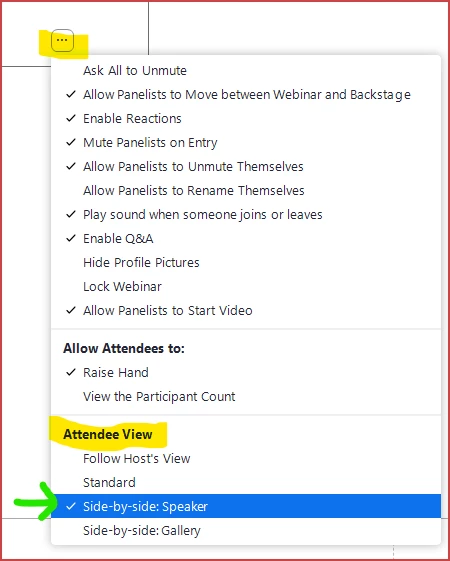
The "Speaker" view -- Side-by-side Speaker when screen sharing, and simply Speaker when not screen sharing -- will show only Spotlighted videos if any are spotlighted; if none are spotlighted, then the Active Speaker is shown. Side-by-side creates a vertical bar that separates the camera video from the shared screen.
If you want NO camera video visible, have all Panelists, Co-Host. and the Host turn their camera video off, and select Standard for the Attendee View. This is the only way to show only the shared content and nothing else.


