Newcomer
Aug 25, 2023 5:04 PM UTC
Solved

Banners on Zoom Webinar

Hi! I created a zoom webinar that originally had a banner image and then both the image and banner upload option disappeared from the branding section. Is anyone else having this problem that can help? 

    TamieN
    TamieNAnswer
    Participant
    Aug 29, 2023 4:21 PM UTC

    You have to have your Admin if you are not one go into their settings. 

    Once that is enabled your banners and logos will reappear.  They will be under the newer items on the branding tab. 

    Hope this helps! 

    Tamie

    14 replies

    Newcomer
    Aug 25, 2023 10:28 PM UTC

    Hi, I'm experiencing the same problem.  Yesterday the banner and logo appeared on the registration page, and today both the banner and the logo have disappeared.  Additionally, the options under branding to upload the banner and logo are no longer available.  Is this a known issue, can someone help?

    Translate
    TamieN
    Participant
    Participant
    Aug 30, 2023 11:57 AM UTC

    There is a new setting that has to be switched by an admin to get them back. 


    Translate
    Newcomer
    Aug 31, 2023 1:54 PM UTC

    Hello! Can you give me more details on where I can find this option? I am an administrator and I can't find where to modify that option or how to find it in the configuration.

    Translate
    Partner
    Aug 28, 2023 2:19 AM UTC

    I have the same issue. Seems like Zoom makes admin can control the banner and logo but this is insane.  Every single webinar supposed to have their own banner. This is ridiculous. I found that the meeting registration still have that function!! Zoom should roll back this feature. 

    Translate
    TamieN
    Participant
    Participant
    Aug 30, 2023 11:58 AM UTC


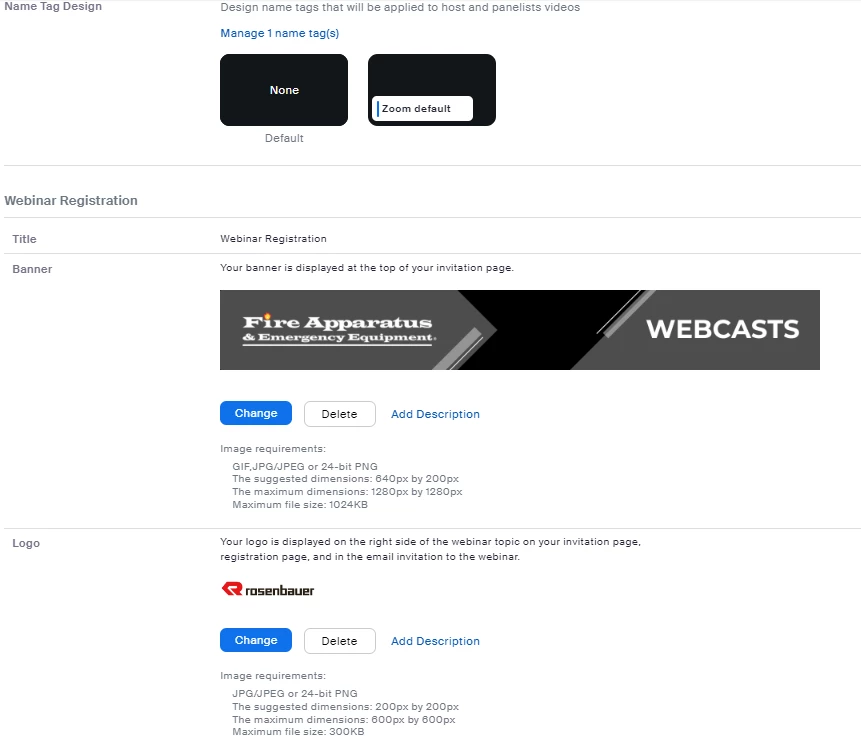
    see the image above, needs to be swtiched on by an admin.


    Translate
    Explorer
    Aug 28, 2023 7:55 PM UTC

    Same thing has happened to us. I lost the ability to add logo or banner, but I can still modify themes, etc... Any reason why this would be happening? 

    Translate
    TamieN
    Participant
    Participant
    Aug 30, 2023 11:58 AM UTC

    see the image below, needs to be switched on by an admin. 


    Translate
    TamieN
    Participant
    TamieNAnswer
    Participant
    Aug 29, 2023 4:21 PM UTC

    You have to have your Admin if you are not one go into their settings. 

    Once that is enabled your banners and logos will reappear.  They will be under the newer items on the branding tab. 

    Hope this helps! 

    Tamie

    Translate
    Partner
    Aug 30, 2023 12:28 AM UTC

    Thanks Tamie, When I tested it didn't work but now it's working. Thanks for helping me. 

    Translate
    Newcomer
    Oct 17, 2023 2:38 PM UTC

    Ad blockers will also remove the banner portion of the webinar registration branding. Hope this also helps someone down the line.

    Translate