
Stop the Scheduling Spiral: Automate Your Meetings with Zoom Scheduler
It's 9:02 AM on a Monday. You open your inbox to find 14 new messages, and 10 of them are some variation of: "Does Tuesday at 2:00 PM work? No? How about Wednesday at 4:00 PM?".
Before you've even had your first cup of coffee, you're already paying what feels like a "productivity tax". You are spending more time scheduling meetings than actually being in them. Zoom Scheduler was built to address that tax, offering automated scheduling and smart calendar management so you can get back to the work that matters more.
Which "Time Warrior" Are You?

Before we dive into the technical "how-to," take a moment to identify your workflow. Zoom Scheduler isn't a one-size-fits-all tool; it adapts like a chameleon to your specific role.
🏢 The Executive Assistant (The Firefighter)
Your executive's calendar is like a "juggling act". You coordinate across three time zones, juggle board members, and handle last-minute "can we push this?" requests.
Your executive's calendar is like a "juggling act". You coordinate across three time zones, juggle board members, and handle last-minute "can we push this?" requests.
🚀 The Small Business Owner (The Solopreneur)
You're a coach, consultant, or creator. Your audience is on social media, and you need a professional way to book consultations and collect payments without managing five different apps.
🎓 The Recruiter (The Connector)
Your job is to align multiple managers for a single panel interview. When schedules don't align you get forced back into a cycle of "phone tag" and risk losing top talent to faster-moving competitors.
Your Goal: Use Collective booking to find the slots where every interviewer is free, supporting a faster "time-to-hire".
👥 The Team Lead (The Optimizer)
You are tired of playing middleman and want to automate the logistics of team coordination so you can focus on coaching and results.
Your Goal: Use Round Robin to automatically distribute meetings across your team or Collective booking to align everyone for co-selling calls.
The All-in-One Advantage: A Case for Consolidation
Many professionals use "A La Carte" tools, but toggling between disconnected systems may add friction. Here is what an integrated platform can offer:
| Feature | Standalone Tools | Zoom Scheduler |
| Workflow | Involves switching between multiple apps | Unified experience for scheduling and meetings |
| Meeting Creation | Often manual or dependent on third-party integration | Automatically generates Zoom meeting links during scheduling |
| AI-Powered Meeting Assistance | May require separate tools or extra subscriptions for different AI capabilities | Generate AI meeting summaries and follow-ups for appointments with Zoom AI Companion.* |
| Cost | May involve multiple monthly subscriptions depending on the tool set | Included with Zoom Workplace at the Business tier and higher, or available as a standalone add-on for other plans |
Core Features for Everyday Use
Zoom Scheduler lives inside the Zoom Workplace platform, reading your availability in real time to block conflicts.
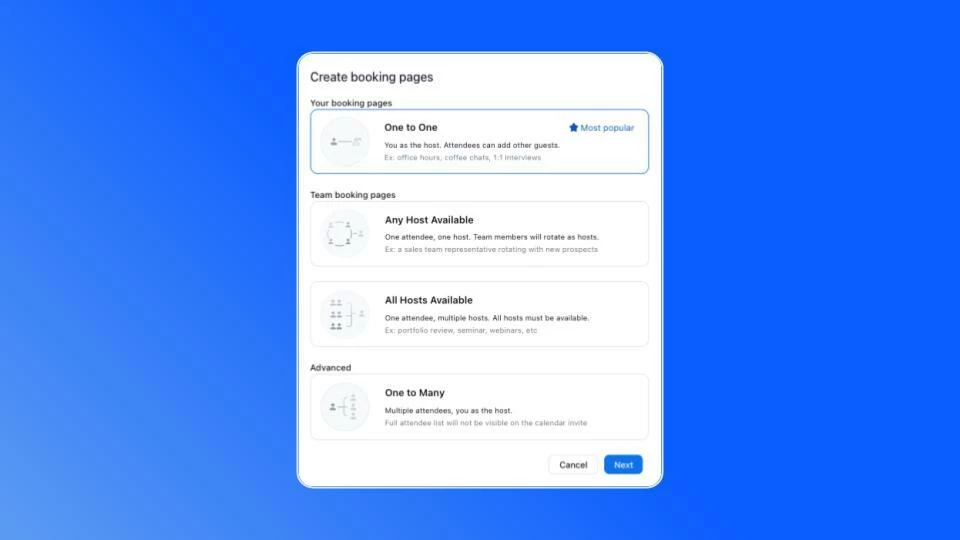
- Multiple Booking Formats: Supports One-to-One, Round Robin (team rotation), Collective (all hosts free), One-to-Many (webinars/workshops), and One-Off links.
- Calendar Sync: Connect up to five calendars (Google, Microsoft 365, or Zoom) on paid plans to prevent double-bookings.
- Custom Branding: Add your logo, brand colors, and a custom URL to help maintain a professional experience.
- Monetization: Connect Stripe to accept payments at the time of booking so you spend less time chasing invoices. Stripe integration availability may vary by region and account type.
- Buffer Time: Automatically set buffer time between calls so you aren't sprinting from one meeting to the next.
Deep Dive: The "Executive Assistant"
The secret weapon for EAs is Scheduling Privilege. This allows you to manage an executive's calendar on their behalf.
Pro Tip: Once access is granted, you're automatically added as an Alternative Host to all meetings you schedule for your exec. That means you can start the meeting or manage the waiting room if they're running late.
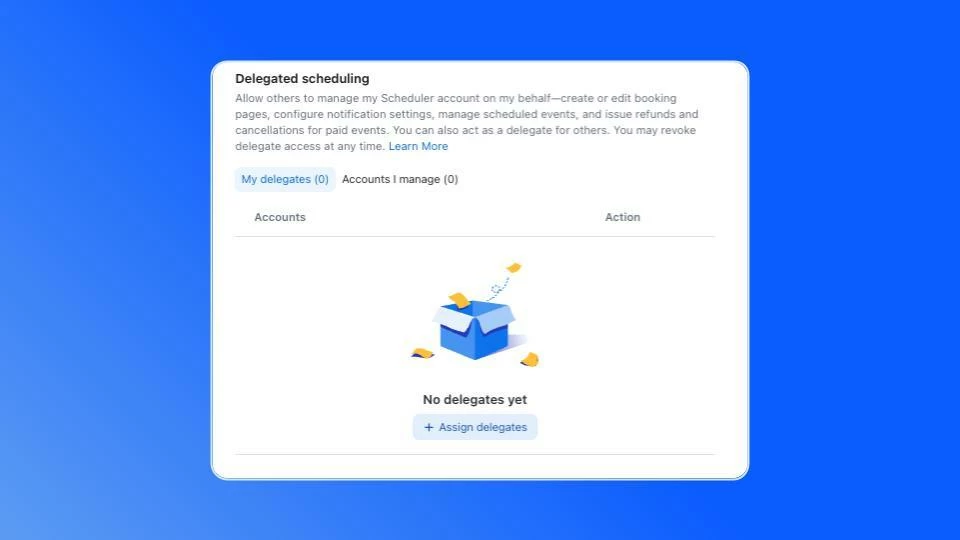
How to Set Up Delegate Access for Zoom Scheduler
- Exec Side: Sign in to the Zoom web portal
- Navigate: Go to Scheduler → Settings → scroll to bottom of the page
- Assign: Click + next to "Assign delegates" and enter the EA's email
- Activate: The EA signs out and back in to activate the new powers