

Explorer
Nov 5, 2024 12:03 AM UTC
Solved

Recording in-coming call custom notification

The current notification says "The call is being recorded, if you do not wish to be recorded please hang up now". 

I've created a custom audio file in the asset library notifying the caller the call is being recorded.


How do I get that custom response to play at the beginning of a in-coming call vs. the zoom notification?
EliotAnswer
Partner
Nov 5, 2024 1:37 AM UTC

hi mbfull,


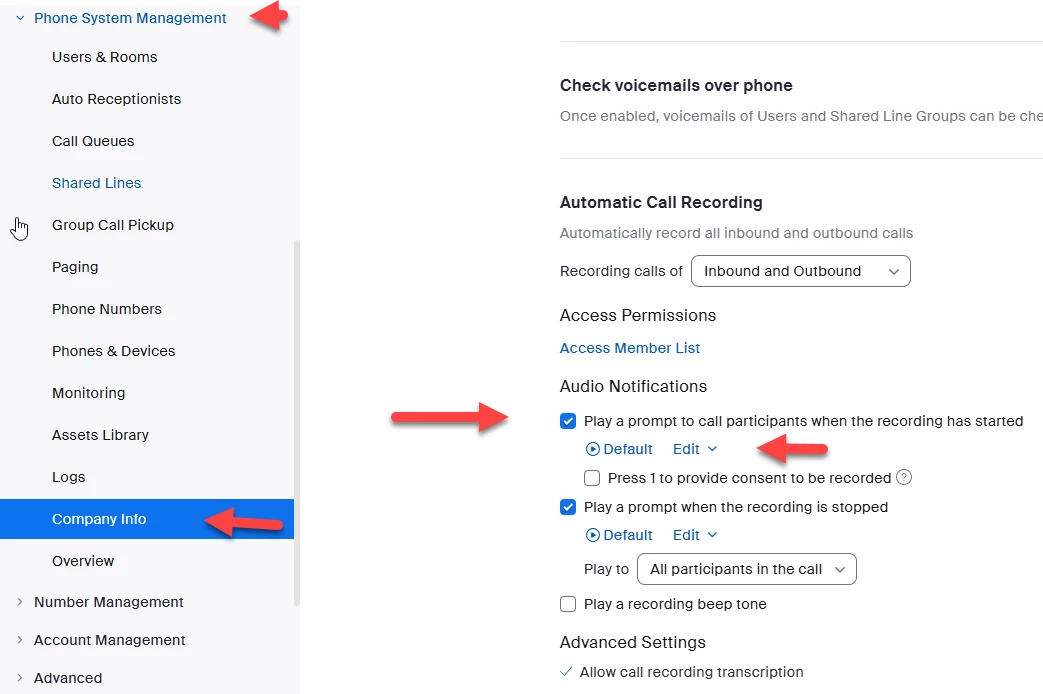
you can select edit and upload and choose what audio file you want to use.


admin->phone system management->company info->policy->automatic call recording

see screen shot below.


Did my response answer your question? If so, please don't forget to mark the reply as an accepted solution.


thanks,  eliot

2 replies

EliotAnswer
Partner
Nov 5, 2024 1:37 AM UTC

hi mbfull,


you can select edit and upload and choose what audio file you want to use.


admin->phone system management->company info->policy->automatic call recording

see screen shot below.


Did my response answer your question? If so, please don't forget to mark the reply as an accepted solution.


thanks,  eliot

Translate
mbfullAuthor
Explorer
Nov 5, 2024 2:05 AM UTC

Thank you this was helpful - updating the path to automatic call recording 

Account Management > Account Settings > Zoom Phone

Translate