


shrabonidey94
Explorer
Explorer
Aug 2, 2023 10:51 AM UTC
Solved

Zoom was narrating everything


Hello All, I'm seeking support on Zoom technical issue which i faced yesterday during hosting a meeting where I was sharing my screen (sharing videos and audios), accepting participants from waiting room etc. The problem which I faced was that the zoom was narrating everything like when a person is joining the meeting or when person is leaving, when i was making someone co-host, or when I started sharing my screen. Please help me to figure it out because tomorrow again i have to do the same.

Also, let me know if it is a global issue from the main account or was a problem with my zoom account or system(mac).

Thanks!


Frank_TBAnswer
Partner
Aug 2, 2023 12:20 PM UTC

Hello,


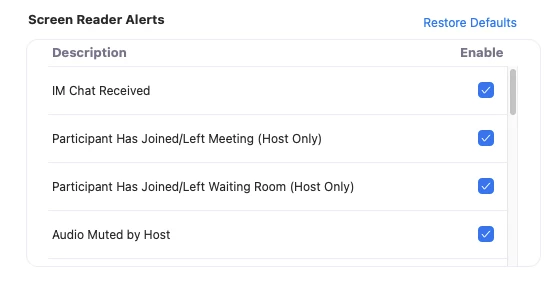
It sounds like you have the Zoom Screen reader turned on.


Screen reader alerts allow you to hear custom announcements using your screen reader whenever specific actions are performed in Zoom, such as when the host has muted audio, when closed captioning is available, or when you have received an IM chat message. You can manage which alerts you want the screen reader to announce.


How to enable or disable screen reader alerts


  • Sign in to the Zoom desktop client.
  • Click your profile picture, then click Settings.
    Click the Accessibility tab.
  • Select the check box next to each alert to enable or disable it.


https://support.zoom.us/hc/en-us/articles/360048870451-Using-screen-reader-alerts 


Regards

If my reply helped, don't forget to click the accept as solution button!


23 replies

Frank_TBAnswer
Partner
Aug 2, 2023 12:20 PM UTC

Hello,


It sounds like you have the Zoom Screen reader turned on.


Screen reader alerts allow you to hear custom announcements using your screen reader whenever specific actions are performed in Zoom, such as when the host has muted audio, when closed captioning is available, or when you have received an IM chat message. You can manage which alerts you want the screen reader to announce.


How to enable or disable screen reader alerts


  • Sign in to the Zoom desktop client.
  • Click your profile picture, then click Settings.
    Click the Accessibility tab.
  • Select the check box next to each alert to enable or disable it.


https://support.zoom.us/hc/en-us/articles/360048870451-Using-screen-reader-alerts 


Regards

If my reply helped, don't forget to click the accept as solution button!


Translate
shrabonidey94
Explorer
Explorer
Aug 2, 2023 12:52 PM UTC

Thank you so much for your help!


Translate
Partner
Aug 2, 2023 1:23 PM UTC

Happy to help.

Regards

Translate
Newcomer
Oct 13, 2023 9:50 PM UTC

I'm having the same issue. everything is disabled and im still hearing it talk

Translate
Newcomer
Nov 6, 2023 7:54 AM UTC

I disabled all the screen reader alerts and it still announcing, I also disabled it in my computer accessibility settings, what should I do? 

Translate
Newcomer
Dec 7, 2023 10:00 PM UTC

I disabled all the screen reader alerts and it still announcing, I also disabled it in my computer accessibility settings, just like everyone else.  I uninstalled and reinstalled.  Looks like there's a bug.  Maybe it's not updating our preferences on the backend when the request is made to your API. 

Did anyone else ever find a solution (other than the one that was accepted)?

Translate
Newcomer
Dec 8, 2023 12:22 AM UTC

Having same problem tonight as you did a few hours ago. Really hope this gets fixed. 

Translate
Newcomer
Feb 6, 2024 2:57 AM UTC

Nothing I do is fixing this. I want this guy to stop announcing everything and interrupting all the time!!! I hate this. If this is a bug, it needs to get fixed ASAP.

Translate
Newcomer
Feb 29, 2024 4:16 PM UTC

I have the same problem!!  Everything is disabled and it still does voiceover for everything in Zoom.  How do we make this stop?!?!

Translate
Newcomer
Dec 11, 2024 5:41 PM UTC

I am still having this issue, have tried all of the mentioned work arounds and it's becoming incredibly frustrating for not only me but my coworkers. Please fix this or let me know what I can do to remedy this issue. 

Translate
Newcomer
Jan 8, 2025 7:07 PM UTC

I am having the same problem.  Can someone please help?


Translate
MGSR
Community Manager
Community Manager
Jan 16, 2025 9:47 PM UTC

Welcome to the Zoom Community, @kme167! Kindly check out @CarlaA's answer in this thread. 

Translate
Newcomer
Mar 21, 2025 2:11 PM UTC

Good morning, 

@CarlaA & @MGSR - I can confirm that my Screen Reader settings are all disabled yet the issue is persisting. Zoom actions continue to be narrated over my speakers, same as OP.


Issue is not resolved via proposed solution.

Translate