Explorer
Jan 18, 2022 7:54 PM UTC
Solved

Zoom Client Sound Test Failure

Hey all - I'm a long time Zoom host and consider myself competent for the standard end user solutions. 


Issue:  USB wireless Corsair Headphones fails sound test in Zoom client.


Troubleshooting:

  • All other apps recognize Corsair headphones and provide output without issue.
  • Speakers pass output test in zoom client.
  • Same headphones pass sound test in Zoom app on alternate devices.
  • Headphones provide audio output through Chrome browser - zoom meeting.
  • Checked for PC updates
  • Completed uninstall of all zoom download/install files using CleanZoom.zip provided by Zoom.
  • Rebooted PC


    Ray_Harwood
    Partner
    Jan 19, 2022 2:44 AM UTC

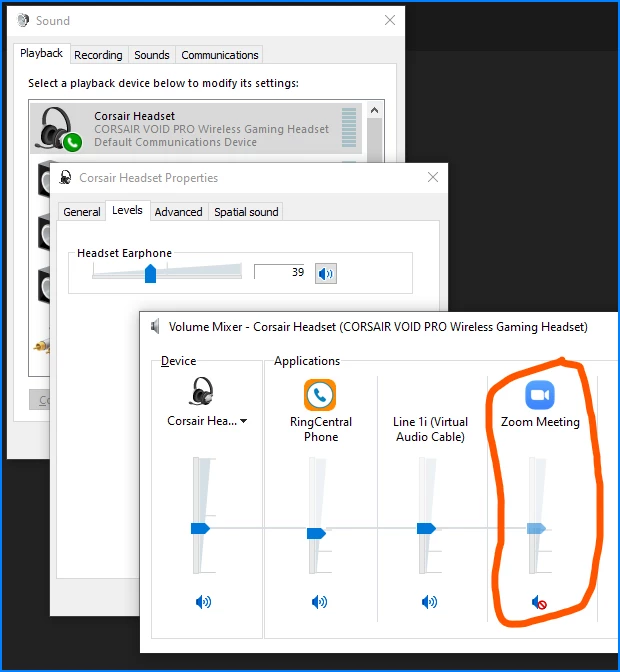
    Check your Corsair's volume in Sound Control Panel / Properties window, or in Volume Mixer:


    Also check settings in iCue, if you have that installed. 


    And also check to be sure you don't have Zoom muted in your Corsair Headset.  I have done this way too many times myself -- watching a long meeting, muting the audio, leaving the meeting, and forgetting to unmute the Zoom audio.


    Hope that helps...

    2 replies

    Ray_Harwood
    Partner
    Partner
    Jan 19, 2022 2:44 AM UTC

    Check your Corsair's volume in Sound Control Panel / Properties window, or in Volume Mixer:


    Also check settings in iCue, if you have that installed. 


    And also check to be sure you don't have Zoom muted in your Corsair Headset.  I have done this way too many times myself -- watching a long meeting, muting the audio, leaving the meeting, and forgetting to unmute the Zoom audio.


    Hope that helps...

    Translate
    howdypalAuthor
    Explorer
    Jan 19, 2022 7:03 AM UTC

    Thank you so much!!!!! This was an instant solution! I had seen the zoom client in the volume mixer, but not the "meeting controls" which had to be scrolled for, lol! 

    Translate