Newcomer
Jan 28, 2022 2:59 PM UTC
Solved

Video not working

During a video conference the light of my camera stays ON but there is no video. I checked the app camera and it is working, but not in a zoom conference. Can anybody help me?

    jeremyjustin
    Employee
    Jan 28, 2022 3:37 PM UTC

    Hi @jmf thank you for your post here on the Zoom Community! I have seen this issue before and wanted to offer some thoughts

    - occasionally you may have another app open that is using the camera and tying up the camera in such a way that it can't be shared with other apps. Microsoft Skype for example is one I have seen do this. If you can completely exit out of any apps that might be using the camera and try Zoom again that would be great. 


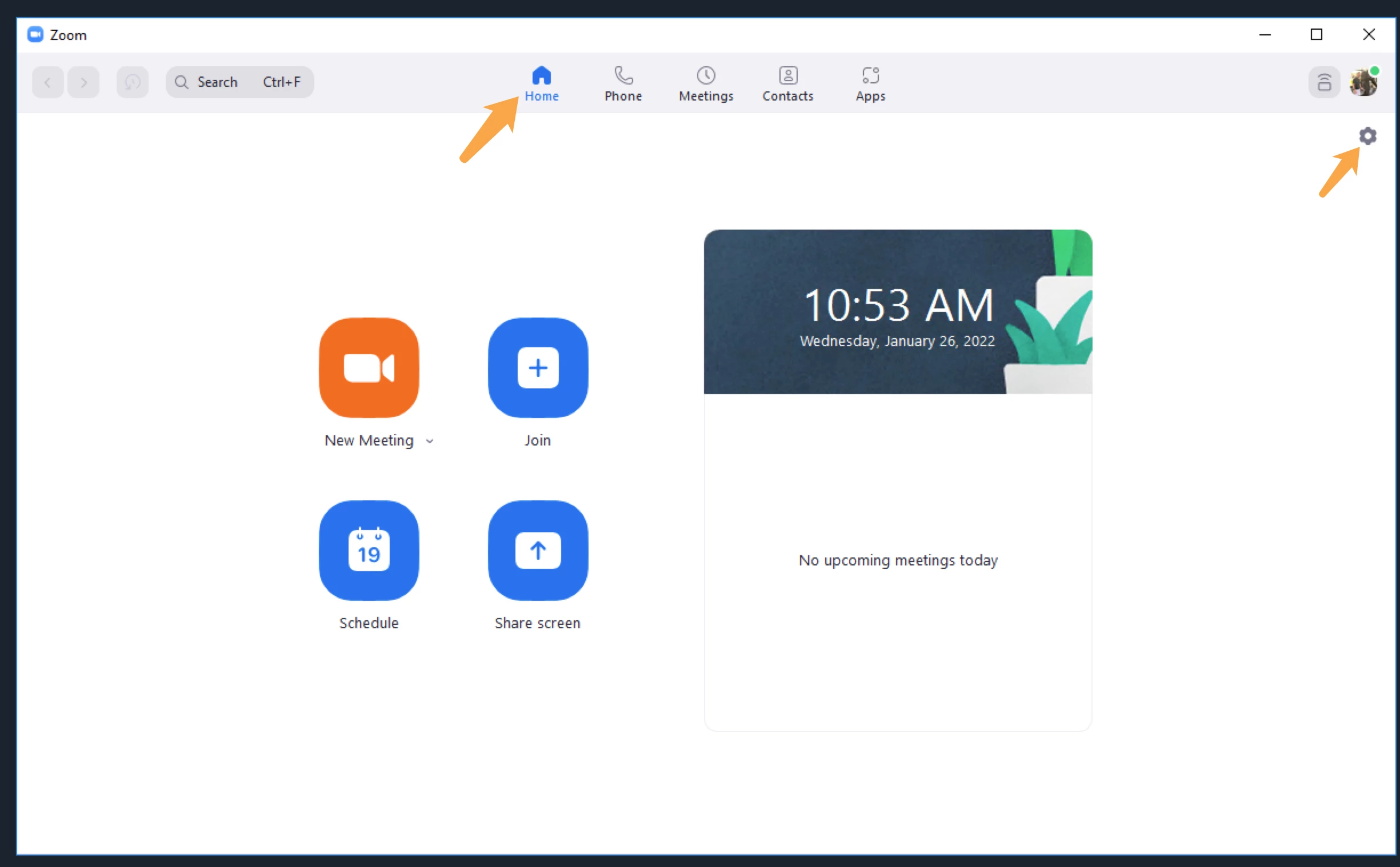
    Also, you can go into your Zoom client settings


    You can even do this when you are not in a meeting. Click on Video, and you will see some camera choice options there. If your camera is recognized by Zoom you will see a small picture of yourself in camera. 


    If this has answered your question to your satisfaction, please click the "Accept as Solution" button below but if not please reply and we can continue the  discussion. Thank you!

    18 replies

    jeremyjustin
    Employee
    Employee
    Jan 28, 2022 3:37 PM UTC

    Hi @jmf thank you for your post here on the Zoom Community! I have seen this issue before and wanted to offer some thoughts

    - occasionally you may have another app open that is using the camera and tying up the camera in such a way that it can't be shared with other apps. Microsoft Skype for example is one I have seen do this. If you can completely exit out of any apps that might be using the camera and try Zoom again that would be great. 


    Also, you can go into your Zoom client settings


    You can even do this when you are not in a meeting. Click on Video, and you will see some camera choice options there. If your camera is recognized by Zoom you will see a small picture of yourself in camera. 


    If this has answered your question to your satisfaction, please click the "Accept as Solution" button below but if not please reply and we can continue the  discussion. Thank you!

    Translate
    Newcomer
    Mar 16, 2022 11:19 AM UTC

    Hi

    I've tried this and my camera works in test mode under settings, but I cannot be seen on video calls nor can I see others on those calls.


    Should I try to reinstall everything? Any other thoughts?


    Regards


    Translate
    Explorer
    Dec 17, 2022 6:19 PM UTC

    I have the same issue with My HP Envy desktop. All systems and devices work fine. I can see myself and all participants, but they can't see me. I did a clean and reinstall - nothing. I've tried everything I can think of. ANt recommendations?

    Translate
    Newcomer
    Jan 23, 2023 11:20 AM UTC

    I have the same problem on my Dell Inspiron 14 with Zoom meetings. My video is on, I can see others but they can't see me. The screen with name on it is black. How can I rectify this please?


    Translate
    Newcomer
    Jan 23, 2023 4:02 PM UTC

    This probably isn't the problem you are having but I just found a thing that might help with this. My problem was that I kept using the Google Login option from the Zoom login icon on the Zoom login in page. When I logged in using my Gmail account username and password without using the Google Login logo my externally mounted camera worked fine as a feed to Zoom's "Video" panel in the Zoom cog settings pop-up menu. Hope this helps.

    Translate
    Explorer
    Jan 31, 2023 3:37 PM UTC

    I fixed the issue by resetting my computer.

    Translate
    Newcomer
    Apr 29, 2023 2:43 PM UTC

    Hello Justin,


    Let me first say thanks for the post and confirm i have same issue. And yet to find any solution even after going through suggestions added below.

    Translate
    Newcomer
    May 1, 2023 8:06 AM UTC

    Your device's or security software might be preventing Zoom from accessing your camera. Allowing Zoom the proper access might solve your camera issues. The following common security software support pages provide details on how to allow camera access to applications like Zoom.


    Regards,

    Diana

    Translate
    Newcomer
    Aug 20, 2023 10:01 AM UTC

    I'm having the same problem.  I'll try these suggested solutions.

    Translate
    Newcomer
    Oct 18, 2024 12:49 PM UTC

    This situation just started in the last day. I have not seen a solution anywhere. Is there one?


    Translate
    Newcomer
    Oct 22, 2024 2:52 PM UTC

    Also just this last week. 
    Lenovo

    No solution yet -- yesterday, after shutting down computer again, the video appeared while testing the app, but the video was upside down. 😕😕

    Translate