

Explorer
Jan 11, 2022 4:24 AM UTC
Solved

Unable to establish secure connection with Zoom

Hi Team,


One of my user in office facing issue while joining Zoom meeting "Unable to establish secure connection with Zoom"

Screen shot is attached. Any idea what we can do in this case. Have already tried reinstalling ZOOM app and User had tried different internet service provider for connecting Zoom meetings
    georgiegAnswer
    Newcomer
    Jan 13, 2023 12:41 AM UTC


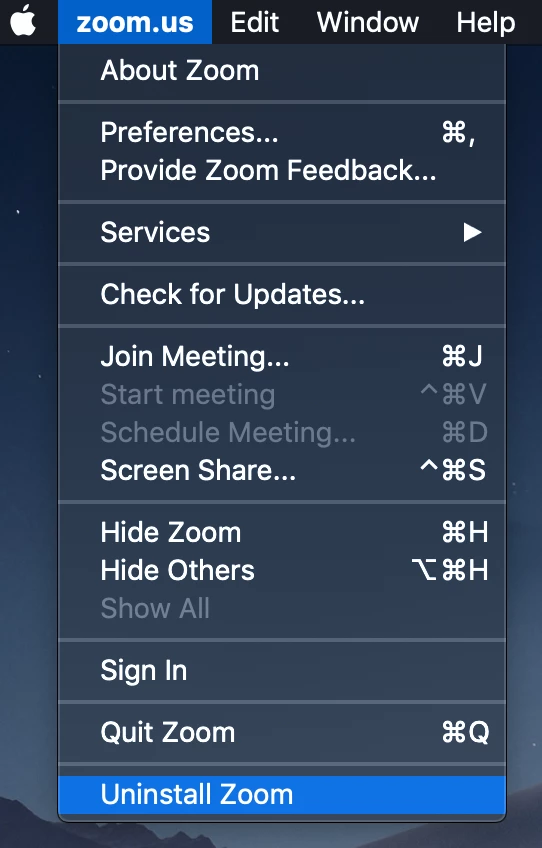
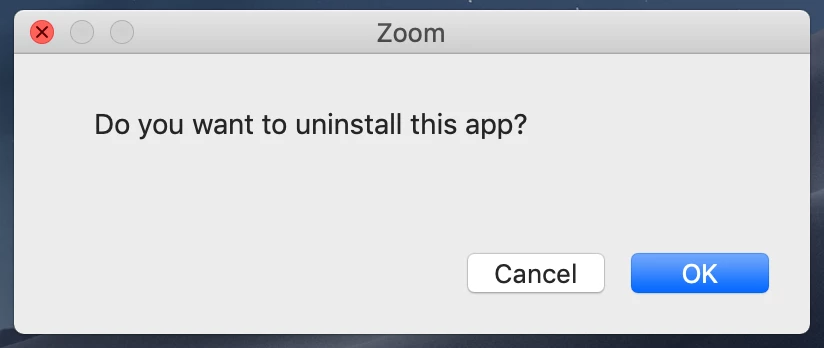
    *I was able to fix this issue - through contacting them by email. It worked on my Mac. Hope this helps someone.

    *Open the Zoom desktop application.


    48 replies

    Newcomer
    Jan 21, 2022 3:17 PM UTC

    I just started seeing this error today. The Zoom error (unable to establish secure connection to zoom) is referencing a certificate generated by our development system for a nonexistent domain for use internally and is completely unrelated to Zoom.


    The error banner keeps popping up and there's no apparent way to suppress it.

    Translate
    Newcomer
    Jul 30, 2023 4:17 AM UTC

    I had the same problem.  I resolved the issue by going to "Add/Remove Programs" searching for Zoom, and clicking uninstall.  After that the message boxes stopped popping up and I could get on with my work.

    Translate
    Newcomer
    Jan 21, 2022 3:22 PM UTC

    The Zoom error banner seems to only display when docker containers are running hosting services on HTTPS tcp/443 serving that certificate on localhost.

    Translate
    Newcomer
    Nov 9, 2023 6:54 PM UTC

    I'm having the same issue

    Translate
    GaganAuthor
    Explorer
    Jan 21, 2022 3:33 PM UTC

    Hi All,

    I am able to fix this by login to Zoom online portal. 

    Under profile setting look for  Calendar and Contacts Integration. Deleted the exiting integration setting and configured as per my company stand again by choosing O365 option. 

    Translate
    Newcomer
    Mar 2, 2022 4:43 AM UTC

    this is what I get HELP

    Translate
    Newcomer
    May 16, 2022 6:39 AM UTC

    I have same issue with our company users.

    Translate
    Newcomer
    Mar 16, 2022 5:44 PM UTC

    Has anyone found a solution for this issue? several users at our company is getting the same error. Zoom not connected status. Unable to establish secure connection. see attachments. Please Help!!!

    Translate
    GaganAuthor
    Explorer
    Mar 16, 2022 5:50 PM UTC

    login to Zoom profile on web browser.

    Under profile setting look for  Calendar and Contacts Integration. Delete the exiting contact and calendar integration setting and reconfigure as per your company standar

    Translate
    Newcomer
    Mar 16, 2022 6:42 PM UTC

    Great! I was able to schedule a meeting Thank you, really appreciated. But i am still getting "not connected" status on top left. see attached screenshot  

    Translate
    Newcomer
    Jun 30, 2022 1:11 AM UTC

    I was having the same problem, and I changed my browser settings to always use secure connections (in Google Chrome go to Settings -> Privacy and security -> Security -> Advanced -> Always use secure connections) and it apparently solve the problem. Hope it helps.

    Translate
    Newcomer
    Jan 10, 2023 3:07 PM UTC

    This just started today. I have tried every suggestion on this thread and nothing is working. I am on a Mac and does not matter if I use Chrome or desktop app. This is becoming debilitating.

    Translate
    Newcomer
    Jan 10, 2023 5:00 PM UTC

    This also started for me last night and is very annoying! Won't go away. I have no settings with my organization for my calendar and contacts integration therefore have nothing to reset. Tried everything else here too and nothing seems to work. 

    Translate
    Newcomer
    Jan 10, 2023 6:33 PM UTC

    This also started for me yesterday and none of the above solutions have worked to resolve it (updates, time/date, calendar sync, etc.). Something must have changed on Zoom's end, right? This question needs revisiting!

    Translate
    Newcomer
    Jan 10, 2023 8:02 PM UTC

    Having the same issue on my Mac running Chrome. Is there a fix for this?

    Translate
    Newcomer
    Jan 10, 2023 11:45 PM UTC

    I'm having the same issue and I have tried all the options on this thread. It just started today. Any update if there is a fix for this?

    Translate
    Newcomer
    Jan 11, 2023 10:15 AM UTC

    I also have had this issue since the beginning of 2023 and it's causing disruption to my meetings. I'd like a solution please zoom. It can't be an unsecured connection when I'm conducting zoom meetings just fine. 

    Translate
    Newcomer
    Jan 11, 2023 1:04 PM UTC

    Additional info: We have 3 macbook pros in the office. All on the same network. Tried both browser and desktop app to use Zoom. Only 1 computer has this issue. I have tried hard-wired to ethernet and wifi. I have disabled Avast. I have tried all solutions mentioned in the thread. The problem computer is on the latest Zoom version 5.13.4 and OS Monterey. 2 with no problem are on 5.12.9 and OS Monterey and 5.12.2 and OS Big Sur. I do not see a way on Zoom.us to download an older version of the software to test. The first I noticed the issue began January 10, 2023 8AM ET. Everything was fine as of January 9 4PM ET. Does anyone from Zoom ever check these threads?

    Translate
    Newcomer
    Jan 11, 2023 10:11 PM UTC

    I am only having this issue on my macbook air. Worked fine on my  pc laptop. First encountered problem last night 


    Translate