Explorer
Oct 26, 2021 2:16 AM UTC
Solved

Two-way chat with Waiting Room - can't find how to enable

The 5.8.3 release provides two-way chat with the waiting room folks. How can I enable it?

    ChrisO
    ChrisOAnswer
    Specialist
    Oct 26, 2021 1:16 PM UTC

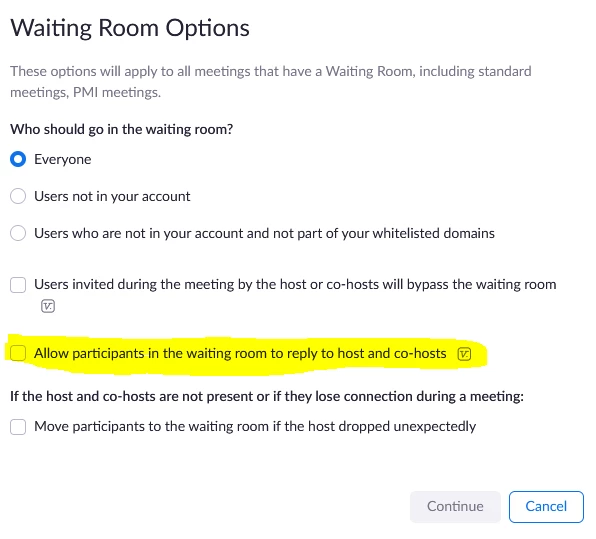
    Account Settings or Meeting Settings>>Waiting Room Options. It requires guests as well as host to be version 5.8.0 or higher to work.


    5 replies

    Newcomer
    Oct 26, 2021 2:54 AM UTC

    Jimi,
    Once someone has joined the waiting room, open up your chat window and instead of selecting "Everyone in Meeting" as the recipients, you can select "Waiting Room Participants".
    See pic attached.

    Translate
    ChrisO
    Specialist
    ChrisOAnswer
    Specialist
    Oct 26, 2021 1:16 PM UTC

    Account Settings or Meeting Settings>>Waiting Room Options. It requires guests as well as host to be version 5.8.0 or higher to work.


    Translate
    Newcomer
    Apr 12, 2022 8:30 AM UTC

    Hi, where can I find the setting? Is the function available for a free account?

    Translate
    Newcomer
    Mar 13, 2023 4:07 AM UTC

    Can you send a chat to only one person in the waiting room?

    Thanks,

    -Ashley

    Translate
    Newcomer
    Mar 13, 2023 12:31 PM UTC

    Ashley,

    Yes, you can choose to send to only one participant in the waiting room.
    Open the participant pane, select Message in the top right corner, and then you can choose to send to Everyone in the meeting,
    Waiting room participants,
    or the individual guests.
    Thanks,
    Bryon

    Translate