Newcomer
May 25, 2023 5:14 PM UTC
Solved

Screen Sharing

How do I make sure that all participants in my private meeting always get the right to share the screen when they join?

Frank_TBAnswer
Partner
May 25, 2023 9:41 PM UTC

Hello,


As a user, you can control several personal settings in the web portal, but some settings may be locked at the account level or group level. This will be noted next to the setting.


Log into the zoom.us web portal

In the Personal section navigate to Settings

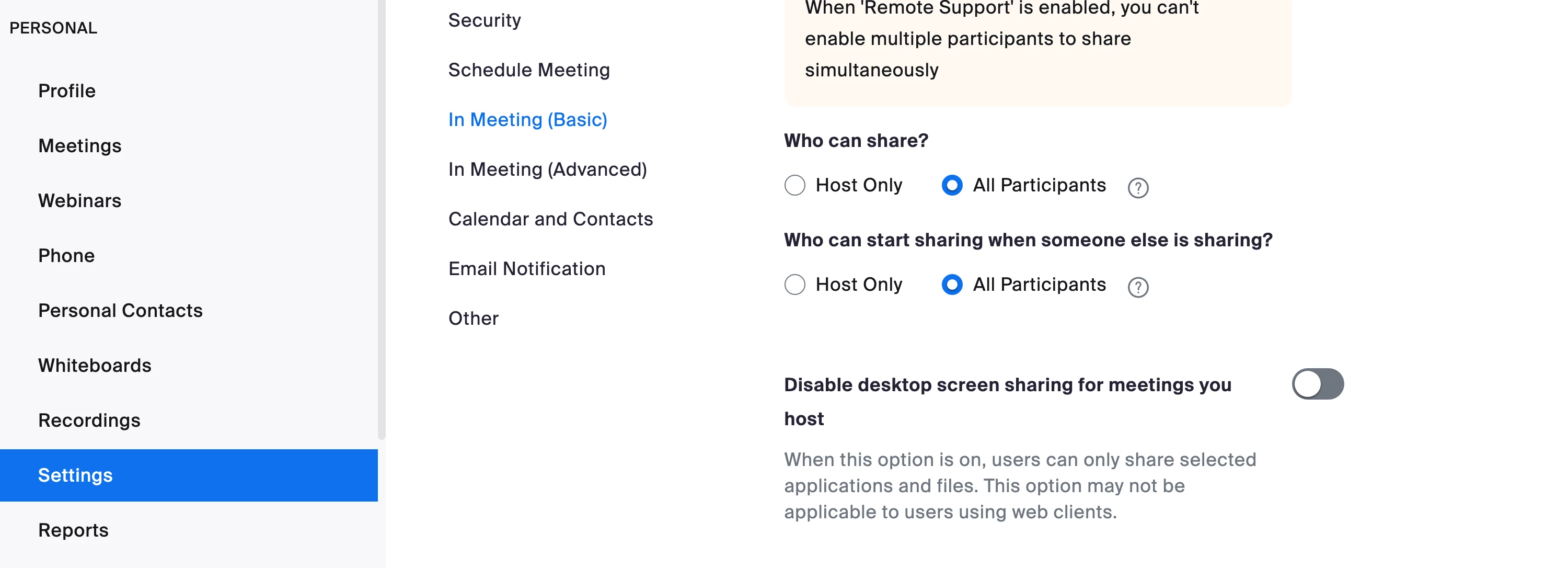
In the In Meeting basic section find ScreenSharing

Change the Who can share setting? to All participants 

Click Save


https://support.zoom.us/hc/en-us/articles/201362153  


Note this will change the setting for all of your meetings going forward. Meetings that are already scheduled will need to be edited one by one.


Regards


If my reply helped, don't forget to click the accept as solution button!

4 replies

Frank_TBAnswer
Partner
May 25, 2023 9:41 PM UTC

Hello,


As a user, you can control several personal settings in the web portal, but some settings may be locked at the account level or group level. This will be noted next to the setting.


Log into the zoom.us web portal

In the Personal section navigate to Settings

In the In Meeting basic section find ScreenSharing

Change the Who can share setting? to All participants 

Click Save


https://support.zoom.us/hc/en-us/articles/201362153  


Note this will change the setting for all of your meetings going forward. Meetings that are already scheduled will need to be edited one by one.


Regards


If my reply helped, don't forget to click the accept as solution button!

Translate
Newcomer
Sep 22, 2023 2:29 PM UTC

But this still requires host to manually enable screen sharing for participants once the meeting has started. 
Is there a setting which allows all the participants to directly screenshare without needing the host to join a meeting and go to security to change the setting?

Translate
Explorer
Aug 20, 2024 2:47 PM UTC

Still trying to get this resolved 😞

Translate