Newcomer
Aug 8, 2024 8:15 AM UTC
Solved

Screen Sharing

Often when I try and share my screen during a meeting, i get a blue screen with an exclamation mark.  why is that?

 

Humashankar
Partner
Aug 10, 2024 2:54 PM UTC

Hi @maxschorr 


To troubleshoot the issue, navigate to Zoom's Advanced Screen Sharing Settings.

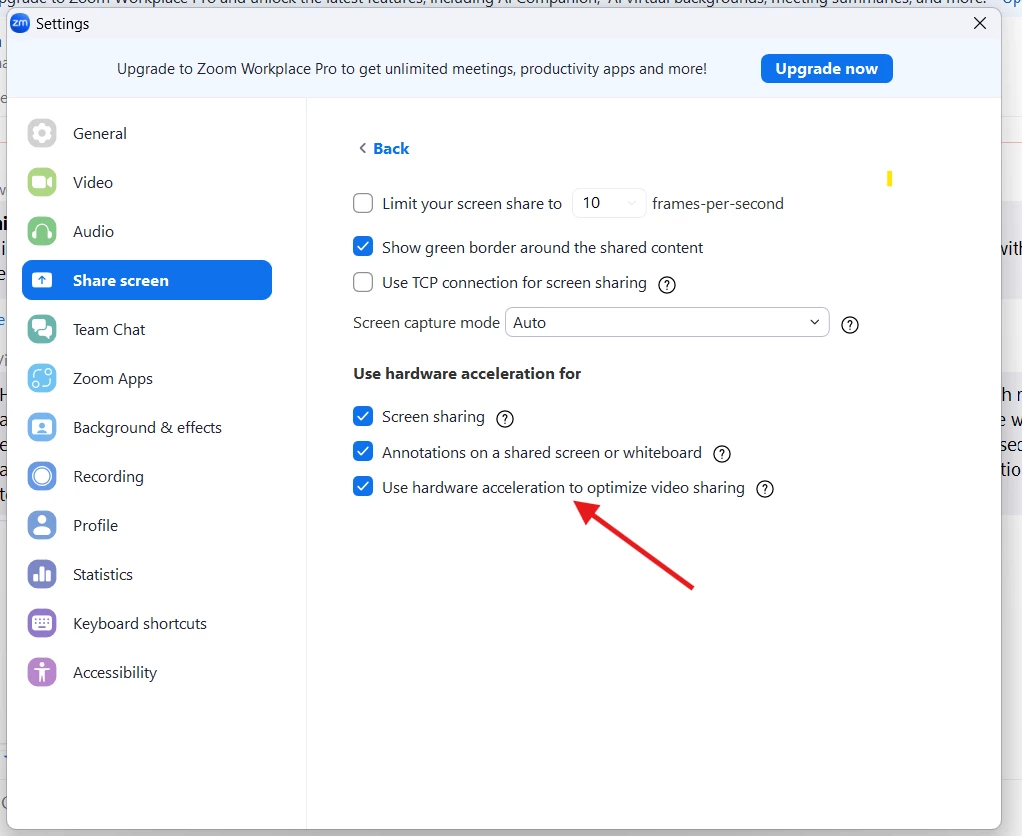
Within the Zoom application, access the Settings menu, then select Share Screen and click on Advanced. Here, you'll find the option for Hardware acceleration for screen sharing. Try toggling this setting, either enabling or disabling it, to see if it resolves the problem


Hope this helps - Happy to help further!!
Thank you very much and have a great one!
Warm regards


1 reply

Humashankar
Partner
Partner
Aug 10, 2024 2:54 PM UTC

Hi @maxschorr 


To troubleshoot the issue, navigate to Zoom's Advanced Screen Sharing Settings.

Within the Zoom application, access the Settings menu, then select Share Screen and click on Advanced. Here, you'll find the option for Hardware acceleration for screen sharing. Try toggling this setting, either enabling or disabling it, to see if it resolves the problem


Hope this helps - Happy to help further!!
Thank you very much and have a great one!
Warm regards


Translate