
Ed_AA_Ltd
Explorer
Explorer
Aug 25, 2021 8:21 AM UTC
Solved

Save recording to Vimeo to save Zoom Storage

Hello!


I have linked Zoom to my Vimeo account and automatically upload the recording to Vimeo.


I have limited Zoom storage, and the recording also saves to my Zoom Cloud, so I have to go in after every meeting and delete the recording on Zoom.


Can anyone advise if there is a setting whereby I can continue to upload automatically to Vimeo without also saving to the Zoom cloud?


Thank you!

 

Ohkawa
OhkawaAnswer
Partner
Aug 25, 2021 8:40 AM UTC

Hi,Ed_AA_Ltd

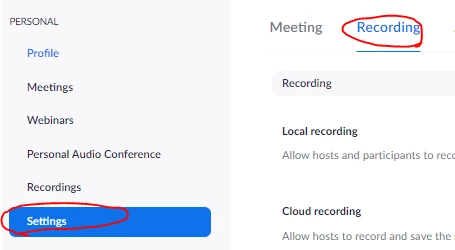
How about using auto-delete to look at it?

https://zoom.us>Settings>Recording>Auto delete cloud recordings after days>set 1 day


3 replies

Ohkawa
Partner
OhkawaAnswer
Partner
Aug 25, 2021 8:40 AM UTC

Hi,Ed_AA_Ltd

How about using auto-delete to look at it?

https://zoom.us>Settings>Recording>Auto delete cloud recordings after days>set 1 day


Translate
Ed_AA_Ltd
Explorer
Ed_AA_LtdAuthor
Explorer
Aug 26, 2021 7:22 AM UTC

Thank you Ohkawa,


I will use that solution. 👍


Kind regards,

Ed


Translate
Explorer
Sep 6, 2021 9:51 AM UTC

Hi,

How did you set up zoom to auto save to your View account for cloud storage?

I have a high volume 3rd party cloud storage and I'd like to set up my Zoom Pro account to auto save to that online cloud storage address.

Kurt

Translate