

Newcomer
Nov 13, 2024 1:16 PM UTC
Solved

recurring meetings

Hello!

My colleague has a recurring meeting which can be start anytime without a concrete schedule. I can't find a way to plan recurring meeting without setting the repeating period. I use a Zoom workspace for MacOs and an iPhone app (6.2.5). How to set such kind a recurring meeting?
KhatCAnswer
Employee
Nov 15, 2024 3:41 PM UTC

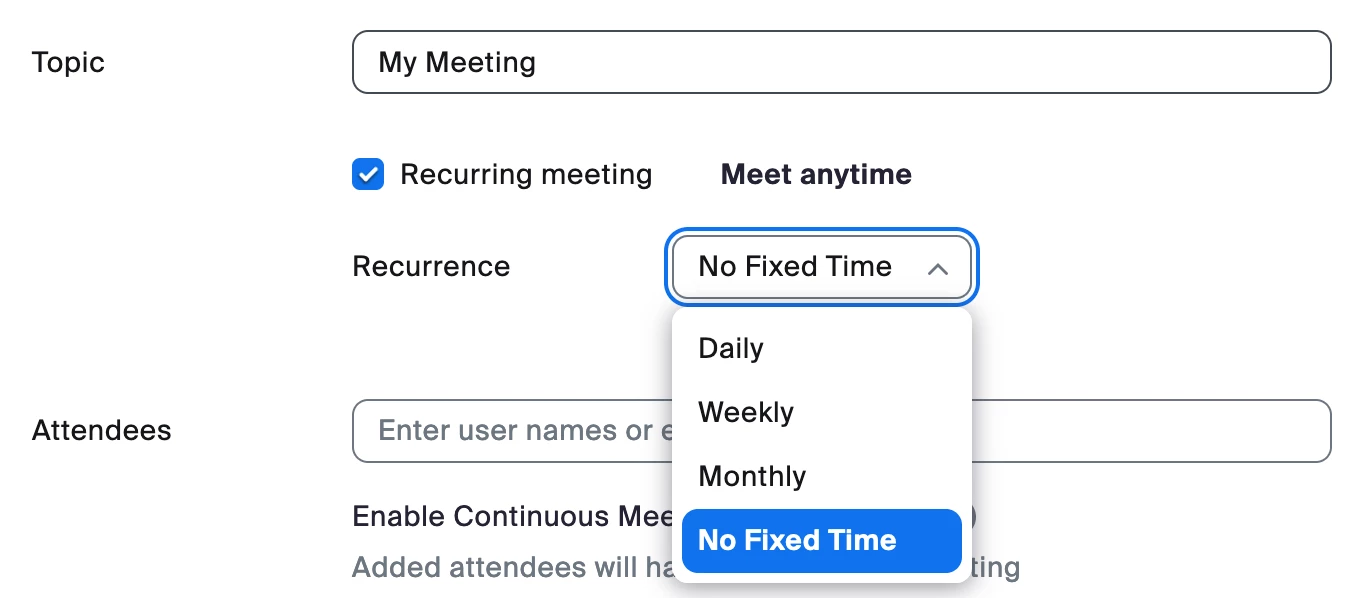
Hi @oksmilic, welcome to Zoom Community! When you schedule a Zoom meeting, make sure to enable "Recurring meeting" and set the Recurrence as No Fixed Time.


Hope this helps! 


4 replies

KhatCAnswer
Employee
Nov 15, 2024 3:41 PM UTC

Hi @oksmilic, welcome to Zoom Community! When you schedule a Zoom meeting, make sure to enable "Recurring meeting" and set the Recurrence as No Fixed Time.


Hope this helps! 


Translate
Newcomer
Dec 1, 2024 11:02 PM UTC

How do you find the previous set up recurring meetings? I have one that seems to have disappeared when I use the Zoom app on the computer and I can't find already set up recurring meetings using the web browser. 

Translate
MGSR
Community Manager
Community Manager
Nov 22, 2024 9:01 PM UTC

Hi @oksmilic! I wanted to let you know that I’ve marked @KhatC's response as the accepted solution, as I believe it answers your question. If you have any more questions or need further clarification, feel free to ask.

Translate
Newcomer
Dec 15, 2024 8:26 PM UTC

This was a problem for me 6 months ago...I set up recurring / no fixed time meeting ID's for each project / client, and could not find a way to do it in the "new and improved" zoom workplace app.  Somehow I discoverd that you CANNOT do it in the app, but have to log on to zoom account in a web browser.  As of today, that is still the only way to set up a new recurring / no fixed time meeting.  Can't someone just fix this already?

Translate