Explorer
Jun 5, 2023 12:21 PM UTC
Solved

Recording problem

Whenever I host a meeting it starts recording it automatically. My cousin turned auto recording on, but I do not know how to off that option. Please anyone tell how to.

RN11_2Answer
Community Manager
Jun 8, 2023 5:23 PM UTC

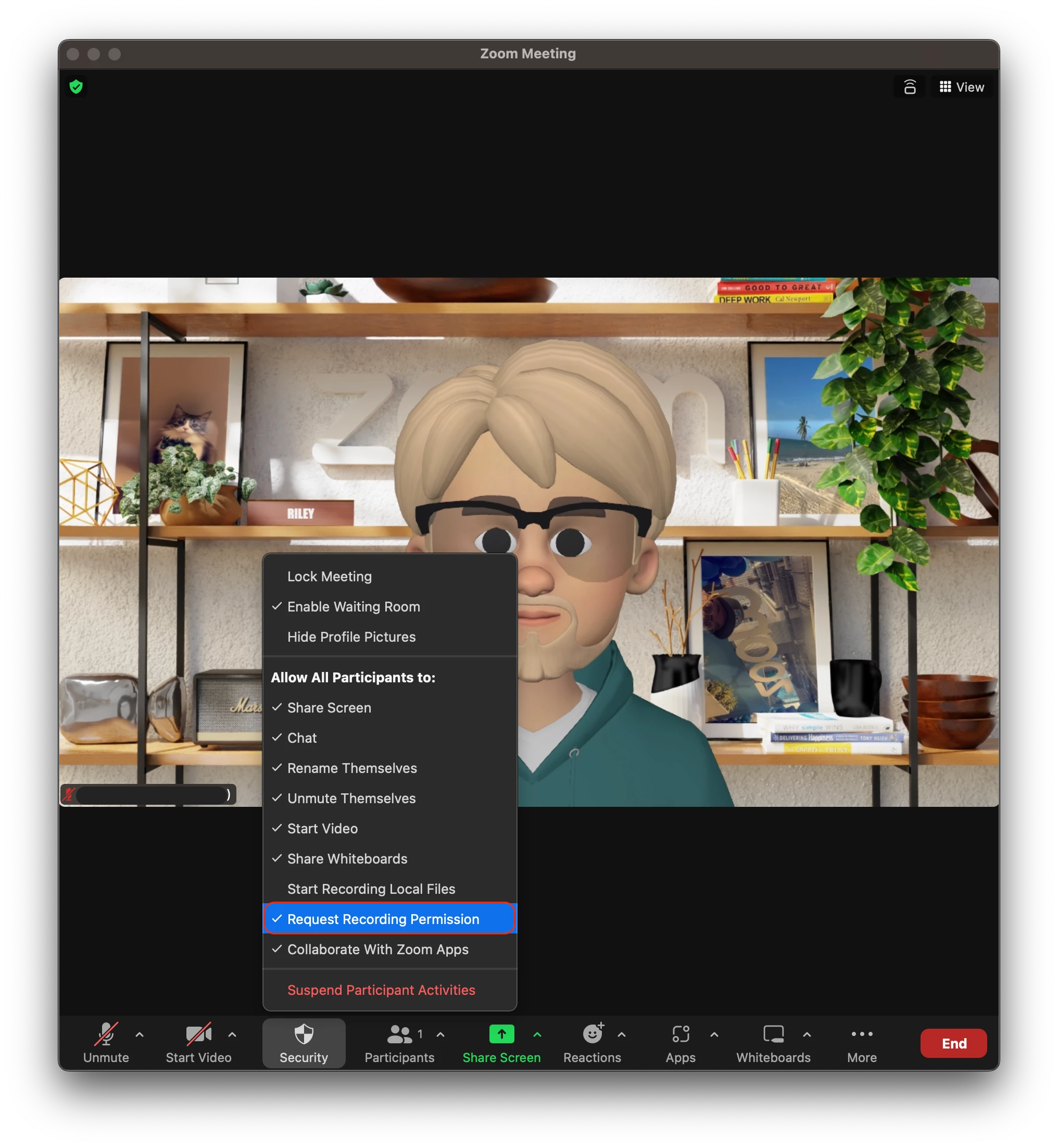
Hi @UltimateZoomie as the host, you can go into you 'security' settings within the meeting, and disable 'Request recording permission' 


3 replies

Explorer
Jun 5, 2023 12:50 PM UTC

hey guys, please answer as i need to host a meeting where recording is banned urgently

Translate
RN11_2Answer
Community Manager
Jun 8, 2023 5:23 PM UTC

Hi @UltimateZoomie as the host, you can go into you 'security' settings within the meeting, and disable 'Request recording permission' 


Translate
Explorer
Jun 8, 2023 7:11 PM UTC

Log into the zoom website then go to settings on the left panel.   Then click the recording tab.   There is a switch there to toggle "Automatic recording".   You can simply toggle that switch off.   There are several settings only available from the website not from the desktop client.  

Translate