Explorer
Jan 19, 2022 3:27 AM UTC
Solved

Profile Names in Meetings Display Then Disappear

When I'm on a Zoom call, the names of participants display for a second or two and then disappear. I have to keep moving my cursor over the main window to bring them back.


Is there a way to keep the names on for the duration of the meeting?

    GreggG_aka_4G
    Employee
    Jan 19, 2022 3:29 PM UTC

    Hello Cp22 -


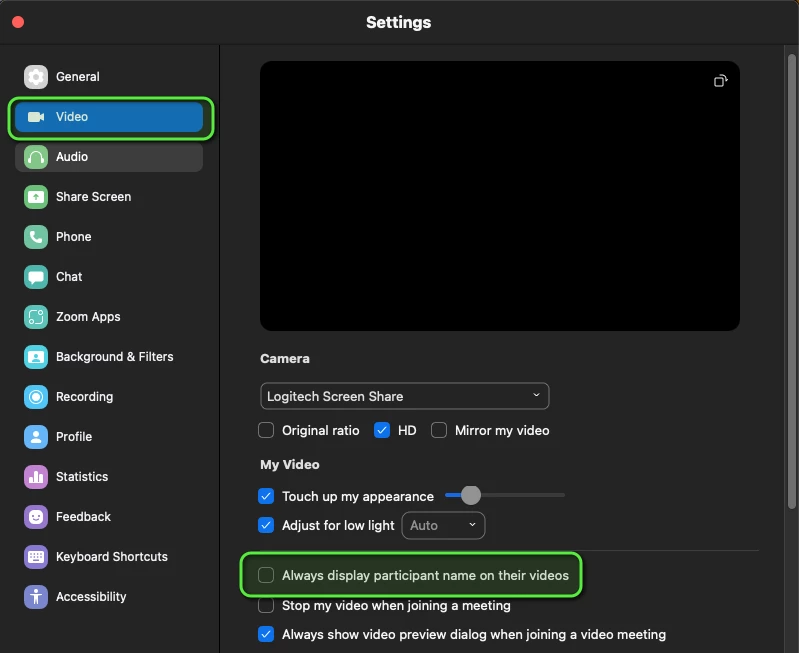
    Under settings, go to Video, then select the option to "Always display participant name on their videos."


    5 replies

    GreggG_aka_4G
    Employee
    Employee
    Jan 19, 2022 3:29 PM UTC

    Hello Cp22 -


    Under settings, go to Video, then select the option to "Always display participant name on their videos."


    Translate
    Cp22Author
    Explorer
    Jan 21, 2022 8:12 PM UTC

    Thank you!

    Translate
    Newcomer
    Jan 17, 2023 6:25 PM UTC

    My screen does not look like that. When I open settings there is no sidebar. I don't know where else to go. 

    Help please

    Translate
    Newcomer
    Jan 17, 2023 6:28 PM UTC


    Translate
    GreggG_aka_4G
    Employee
    Employee
    Jan 17, 2023 7:44 PM UTC

    Could you open up the setting on the client, not via the web portal? You should then see that option available to you. Click on your profile picture in the upper right side of the client. I've highlighted that section in a red square. Click Video, scroll down, and select "Always display participant name on their video."

    Translate