

Newcomer
Oct 13, 2021 8:18 AM UTC
Solved

Polls not showing on recording

Hi - I was testing to check functionality and that everything recorded correctly but on the video recording the sharing of polls and then poll results did not show - is this normal or is there a setting somewhere? Thx in anticipation!

    jaustria
    jaustriaAnswer
    Employee
    Oct 13, 2021 2:18 PM UTC

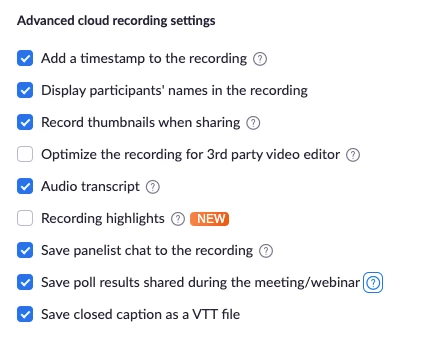
    Hi CatherineT! Welcome to Zoom Community! You might need to go here Zoom Web Portal > Settings > Recording > Advanced Cloud Recording Section and enable Save Poll Results Shared in Meeting/Webinar


    Once it’s on, you can display poll results. HOWEVER they are only shown in the recording


    A) If the host hits “Share results” for the poll in the meeting/webinar
    B) If the attendee selects a tiny tab in the bottom right corner of the recording playback window to pop open the poll results

    3 replies

    jaustria
    Employee
    jaustriaAnswer
    Employee
    Oct 13, 2021 2:18 PM UTC

    Hi CatherineT! Welcome to Zoom Community! You might need to go here Zoom Web Portal > Settings > Recording > Advanced Cloud Recording Section and enable Save Poll Results Shared in Meeting/Webinar


    Once it’s on, you can display poll results. HOWEVER they are only shown in the recording


    A) If the host hits “Share results” for the poll in the meeting/webinar
    B) If the attendee selects a tiny tab in the bottom right corner of the recording playback window to pop open the poll results

    Translate
    Newcomer
    Feb 14, 2023 7:44 AM UTC

    This setting is no longer there.


    Translate
    Newcomer
    Feb 17, 2023 2:42 PM UTC

    Thank you for the update. I was just looking for that feature.  

    Translate