Explorer
Aug 5, 2021 6:46 PM UTC
Solved

No sound output from any device with Zoom app

Have an issue with Zoom where the speaker does not work on any output device - built in speakers, headphones, Bluetooth, etc. The 'test speaker' in the app does not give any output and actually makes Zoom run very slow almost to the point where it locks up and have to kill the app in Task Manager.

Sound output works with every other device works with any other app - Teams, WebEx, GoToMeeting, YouTube, Windows sounds, etc, so 99% sure it is Zoom.

This is on a Dell Latitude 7410 with Windows 10 21H1, all updates done, all drives up to date.

Wondering if anyone has any thoughts.

    Sg20_2Answer
    Newcomer
    Aug 6, 2021 7:49 AM UTC

    Having the exact same problem, since the update. Mic seems to be working. But there is no sound output to any device. Getting the "Failed to Detect Speaker error".  Have tried all sorts of troubleshooting. Pretty sure the problem is in the app. 


    Audio works fine in Meet etc.


    Haven't been able to use zoom in over a week on the laptop, which is an Omen 15!  It's making things rather difficult since I do a lot of online trainings which are all scheduled on zoom. Please help.


    EDIT:

    I just checked the Release Notes for this version 5.7.4(804) and it seems there was to be another release on 2nd Aug to fix this problem, which has been delayed. 

    It specifically says it intended fix this Audio problem for a subset of users. It seems to have broken it for others.... 

    Link is here: https://support.zoom.us/hc/en-us/articles/201361953-New-Updates-for-Windows


    Putting it here incase it helps others....save you some time looking for a solution that does not currently exist. Its not your system that is at fault. 


    Hope we get the fixed update soon! 


    EDIT 2: SOLUTION

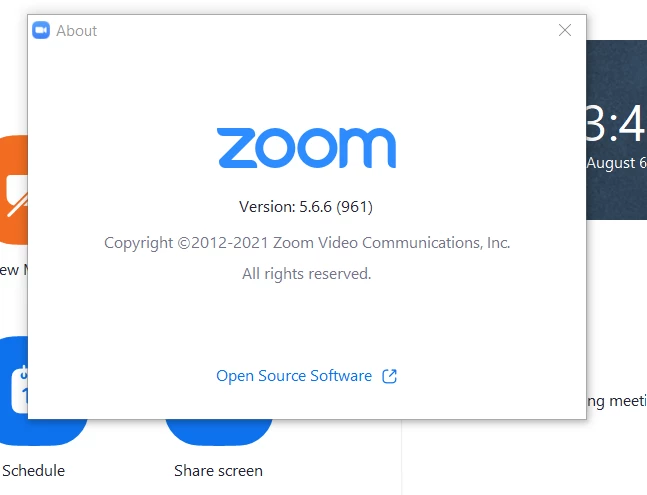
    I found a temporary solution. I just installed the previous versions 5.6.6 and audio is now working again. 

    You can get it from here:  https://zoom.us/client/5.6.6.961/ZoomInstaller.exe

    (Link updated to official zoom source)

    I installed it without uninstalling anything and it went back to the previous version. 
     

    32 replies

    Newcomer
    Aug 6, 2021 5:37 AM UTC

    I have the same problem, which seems to have started when I accepted a Zoom app update about a week ago.  (I am very annoyed that I have not been able to find a way to list Zoom app update history!?!!)


    The Zoom app does not produce any sound whether I select "Same as System" or "Speaker/HP (Realtek(R) Audio)" in Settings. No sound is produced when using "Test Speaker" in Settings, either.


    Changing the speaker in Settings seems to take a few seconds, but other than that I do not see the issue with Zoom running slow which mvalpreda reports.


    Zoom works fine when running in a browser.  Only the app does not produce any sound. Like mvalpreda, I am 99% sure the issue is in the Zoom app.


    My workstation is a Lenovo ThinkPad P52 running Windows 10 Pro 21H1.


    When are we going to see a Zoom app update which fixes this problem?

    Translate
    Sg20_2Answer
    Newcomer
    Aug 6, 2021 7:49 AM UTC

    Having the exact same problem, since the update. Mic seems to be working. But there is no sound output to any device. Getting the "Failed to Detect Speaker error".  Have tried all sorts of troubleshooting. Pretty sure the problem is in the app. 


    Audio works fine in Meet etc.


    Haven't been able to use zoom in over a week on the laptop, which is an Omen 15!  It's making things rather difficult since I do a lot of online trainings which are all scheduled on zoom. Please help.


    EDIT:

    I just checked the Release Notes for this version 5.7.4(804) and it seems there was to be another release on 2nd Aug to fix this problem, which has been delayed. 

    It specifically says it intended fix this Audio problem for a subset of users. It seems to have broken it for others.... 

    Link is here: https://support.zoom.us/hc/en-us/articles/201361953-New-Updates-for-Windows


    Putting it here incase it helps others....save you some time looking for a solution that does not currently exist. Its not your system that is at fault. 


    Hope we get the fixed update soon! 


    EDIT 2: SOLUTION

    I found a temporary solution. I just installed the previous versions 5.6.6 and audio is now working again. 

    You can get it from here:  https://zoom.us/client/5.6.6.961/ZoomInstaller.exe

    (Link updated to official zoom source)

    I installed it without uninstalling anything and it went back to the previous version. 

     

    Translate
    Newcomer
    Aug 6, 2021 9:07 PM UTC

    Thanks very much for the link to the Zoom release note which documents the issue.  Great to know that Zoom is aware of the problem and that some of their best people are working on it.  🙂


    Please note that it is possible to work around the problem by launching Zoom in a browser rather than starting the Zoom app.  And if someone instead wants to download and install an earlier version of Zoom, I agree with the comments below that it is better to download Zoom 5.6.6 from the official Zoom source at https://zoom.us/client/5.6.6.961/ZoomInstaller.exe.

    Translate
    Newcomer
    Aug 20, 2021 12:19 AM UTC

    Thank you so much for mentioning that it works in the browser. At least I can still join the meeting while using my cell phone for something else! Great suggestion.

    Translate
    mvalpredaAuthor
    Explorer
    Aug 6, 2021 2:43 PM UTC

    Thanks for the work-around @Sg20_2 ! Don't know why it didn't occur to me to try an older version.

    That got me going again. Glad to see I wasn't crazy. 🙂

    Translate
    Bort
    Employee
    Employee
    Aug 6, 2021 4:23 PM UTC

    Hi @Sg20_2  and @mvalpreda , 

    I'd be cautious about downloading older versions of the Zoom client from unverified sources like that. They can easily add spyware or malware into the installer, which can cause other issues. 
    Here is a download link to the official Zoom 5.7.0 installer: https://zoom.us/client/5.7.0.522/ZoomInstaller.exe

    If you'd prefer another specific older version, I'd be happy to help provide that as well. 

    Translate
    Explorer
    Feb 11, 2022 1:21 AM UTC

    Dear Bort, I am facing exact same problem recently. I tried to reinstall the old version Zoom Client, like 5.6.6 and 5.7.0 mentioned above. But still no sound came out. Could you please show me where I can find a specific older version of Zoom? 

    I checked my version is 5.9.3 (3169), which is autoupdated recently. Maybe the version before the autoupdate such as 5.9.1/5.9.2 can work well... Thanks a lot. 


    Translate
    Newcomer
    Aug 6, 2021 4:46 PM UTC

    I'm having the same exact problem.  Needs to get fixed ASAP!

    Translate
    VA11_2
    Community Manager
    Community Manager
    Aug 6, 2021 5:01 PM UTC

    Our engineering team is aware of this and working to provide a fix as soon as possible. Thank you @Sg20_2 for providing an awesome workaround in the meantime!
    I want to reiterate what @Bort  mentioned, for safety please always use official Zoom client downloads. Here's a link to Zoom 5.6.6 https://zoom.us/client/5.6.6.961/ZoomInstaller.exe or another current workaround is to download the 64-bit version of Zoom from https://zoom.us/download

    Translate
    Newcomer
    Aug 6, 2021 6:00 PM UTC

    That's great to here.  In addition to the audio problem, non-HD screen presentation is way out of whack.  Zoomed in and off-center.  No problem with HD video.  Also popped up with the latest update.

    Translate
    Newcomer
    Aug 8, 2021 9:02 AM UTC

    Glad I could help some people! 


    Agree on the security concerns. I just couldn't find the official source. Thanks for posting the link to that @OneSkyWalker,  @Bort and @VA11_2 


    Collaboration is the only way forward.

    Cheers!

    Sg

    Translate
    Newcomer
    Aug 9, 2021 9:43 AM UTC

    I have exactly the same problem. It needs to be repaired ASAP!

    Translate
    Newcomer
    Aug 12, 2021 10:16 PM UTC

    THANK YOU for the update and the link to reinstall the old version. I have been having the same issue and this worked! 

    Translate
    Newcomer
    Aug 13, 2021 7:29 AM UTC

    Update to close the issue. Today's update to Version: 5.7.5 (939) seems to have fixed the issue. Audio output is working for me. 

    Translate
