

Explorer
Oct 13, 2022 11:32 PM UTC
Solved

Mtg reminder popups for calendar/zoom delegates - how to turn off?

My EA schedules meetings for me as a delegate inside Zoom and Outlook. Now she gets popup reminders of my meetings as well as her own meetings. Is there a way to stop reminders to delegates? She wants to get her own reminders, just not for every person she schedules things for. Thanks.

    VA11_2
    VA11_2Answer
    Community Manager
    Jan 23, 2023 9:26 PM UTC

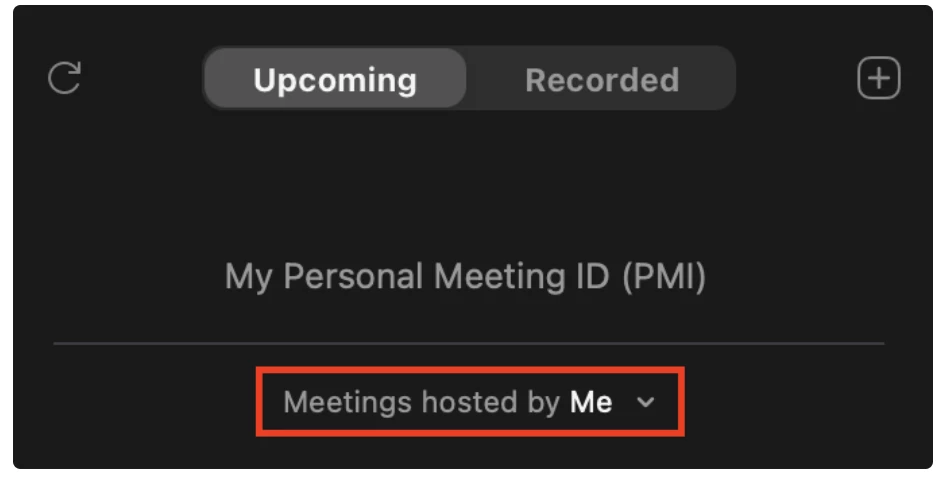
    Hi @arun_baheti and @tomsmith and welcome to the Zoom Community. To reduce the number of upcoming meeting reminder popup notifications being sent to folks with scheduling privileges, please ask them to open the Zoom Desktop Client and select Meetings > Click "Meetings hosted by" and select "Me"


    I hope this helps!

    6 replies

    Newcomer
    Jan 23, 2023 8:19 PM UTC

    Did you ever figure this out?  I have a user that is having the same issue.

    Translate
    Explorer
    Jan 23, 2023 8:23 PM UTC

    @tomsmith Nope, no answers from zoom or anyone else. It is a little frustrating for our EAs. I would think many others are in the same situation so surprised no answer yet

    Translate
    VA11_2
    Community Manager
    VA11_2Answer
    Community Manager
    Jan 23, 2023 9:26 PM UTC

    Hi @arun_baheti and @tomsmith and welcome to the Zoom Community. To reduce the number of upcoming meeting reminder popup notifications being sent to folks with scheduling privileges, please ask them to open the Zoom Desktop Client and select Meetings > Click "Meetings hosted by" and select "Me"


    I hope this helps!

    Translate
    Explorer
    Jan 26, 2023 12:23 AM UTC

    Looks like this worked -- simple too, I figured it had to be something simple. Thank you!


    Translate