

Newcomer
Aug 7, 2023 4:41 PM UTC
Solved

I can't update Zoom on my MacBook

When I try to open Zoom on my MacBook, I get a message that reads "Your app version needs to be 5.12.2 or higher to sign in.  Please update to continue."  When I try to update, however, I get another message that says "Unable to install updates.  Error code: 10004."  Can anyone give me some advice for what to do?  Thank you!
awarsocaAnswer
Newcomer
Aug 10, 2023 3:47 PM UTC

OK all, here is how I fixed it, the below was a little off so I'll tell you where I changed it:


Hi @awarsoca @mgoldax2023 gotcha! Lets try this.. 

  • Please go to Privacy & Security   —> full disk access —> Installer and then enable Privacy & Security   -> Files and Folders —> Installer—>Downloads folder.
  • After enabling these options please reboot your device and try installing the Zoom desktop client app again.

Note:
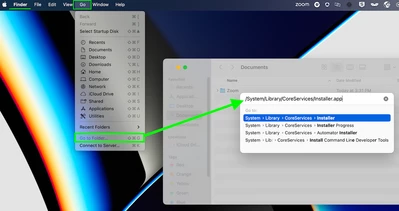
If the installer is not seen at the above location, please add it manually by going to Finder > Go > Go to  Folder...- key in /System/Library/CoreServices/Installer.app and then add the installer once the option is listed.


There are also a couple of discussions around this with some troubleshooting content with some success! 


Hope this helps! 


I did this instead 
  • Please go to Privacy & Security   —> full disk access —> enable us.Zoom.
  • After enabling these options please reboot your device and try installing the Zoom desktop client app again.

Rebooted and tried the pkg in download.  I tried to enable all users but it failed (probably IT admin lockdown).  I then went to finder, go (as above) and navigated as it was shown.  went to the pkg in downloads and installed for myself only and I am good go with Zoom.


 Hope this helps

9 replies

Newcomer
Aug 7, 2023 5:44 PM UTC

I ran into same problem this morning and never had such issue before. Is it possible Zoom was having an internal issue? Susan

Translate
Newcomer
Aug 7, 2023 6:46 PM UTC

I'm having the same issues. It wzs minor in the beginning, but it has become s bigger problem Unfortunately I along with many other people, we rely on you all to much. We use your services to accomplish many things.

Translate
Newcomer
Aug 7, 2023 5:45 PM UTC

me too! How do we get help? Tried to reinstall but can't do that anymore either


Translate
Newcomer
Aug 7, 2023 7:02 PM UTC

I have the same issue and put in a ticket. No help via chat or phone!


Translate
Newcomer
Aug 7, 2023 7:03 PM UTC

Thanks! Please post if you get an answer. I tried to uninstall and reinstall and that didn't work either

Translate
Newcomer
Aug 10, 2023 1:54 PM UTC

Do you have a recent Mac?

My MacBook Air has an M2 chip so I went to https://zoom.us/download in Safari and downloaded 5.15.6 (21146) choosing "Or, for Macs with Apple Silicon chips, click here to download"

Translate
awarsocaAnswer
Newcomer
Aug 10, 2023 3:47 PM UTC

OK all, here is how I fixed it, the below was a little off so I'll tell you where I changed it:


Hi @awarsoca @mgoldax2023 gotcha! Lets try this.. 

  • Please go to Privacy & Security   —> full disk access —> Installer and then enable Privacy & Security   -> Files and Folders —> Installer—>Downloads folder.
  • After enabling these options please reboot your device and try installing the Zoom desktop client app again.

Note:
If the installer is not seen at the above location, please add it manually by going to Finder > Go > Go to  Folder...- key in /System/Library/CoreServices/Installer.app and then add the installer once the option is listed.


There are also a couple of discussions around this with some troubleshooting content with some success! 


Hope this helps! 


I did this instead 
  • Please go to Privacy & Security   —> full disk access —> enable us.Zoom.
  • After enabling these options please reboot your device and try installing the Zoom desktop client app again.

Rebooted and tried the pkg in download.  I tried to enable all users but it failed (probably IT admin lockdown).  I then went to finder, go (as above) and navigated as it was shown.  went to the pkg in downloads and installed for myself only and I am good go with Zoom.


 Hope this helps
Translate
Newcomer
Sep 26, 2023 6:22 PM UTC

Full Disk Access worked for me; I had to toggle Zoom related application on.

Translate
Newcomer
Aug 10, 2023 3:49 PM UTC

Got it working! Thank you!

Translate