

Explorer
Sep 20, 2023 11:08 PM UTC
Solved

How to stop dual screens being taken over by PPT during share screen.

Hello. I am running a hybird style meeting and using my computer to take notes while hosting the meeting and sharing presentations. I am working of a Mac (OS 12.5) and running dual screens (not mirrored). A little background: the way I’d prefer to use my set up is to have the Zoom meeting (a view of participants) on one screen, while taking notes, managing Zoom chat and participants, and doing other work on my main screen.


My issue is when I share a PPT with the group. My process for sharing: I open PowerPoint, begin a screen share, and share the presentation I want (from the app, not from the desktop). When it is shared, the presentation takes over BOTH of my screens, leaving me dead in the water.


What change needs to be made in the Zoom settings that will stop the share screen from taking over my computer?  Toggling between presenter view and main view has not fixed it. 


TIA for your help.
Frank_TBAnswer
Partner
Sep 5, 2024 3:24 PM UTC

5 replies

Partner
Sep 22, 2023 2:51 AM UTC

This is not a Zoom issue, it is a PowerPoint issue,
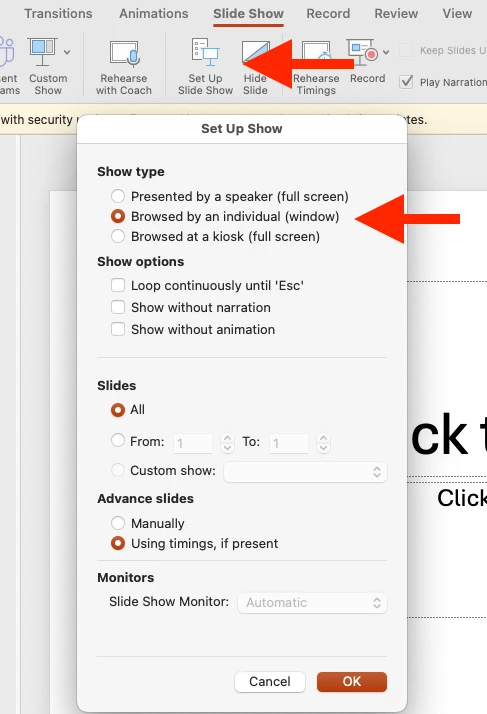
in PowerPoint menu choose slideshow and then set up the slide show.
Choose the show type, and which individual window sounds appropriate and you can choose the slide show monitor and disable the presenter view.
When you have what you want, you can use the Zoom screen share to share the part you want to show.
Even if you overlap the PowerPoint window it should be seen okay by the attendees.

Translate
Newcomer
Jan 25, 2024 2:06 PM UTC

What needs to be done to use MAC Powerpoint in presentation mode on dual monitors without losing the participants' screen?  For example, when I teach and ask participants to mute and comment, they are hidden behind the screen.  Advise welcome

Translate
Newcomer
Sep 5, 2024 3:19 PM UTC

Under "Set Up Slide Show" select "Show type" -> "Browsed by an individual (window)"

Translate
Frank_TBAnswer
Partner
Sep 5, 2024 3:24 PM UTC

Translate
Newcomer
Dec 11, 2024 2:20 PM UTC

Thanks for this solution. My follow up question is: Is there a way to share the presentation that allows for in-slide animation? In my experience, this feature has been disabled when sharing as "Browse by an individual (window)" 

Has anyone else encountered this issue? Thanks!

Translate