Newcomer
Oct 12, 2022 3:57 AM UTC
Solved

How can I eliminate the date/time stamp on recordings?

No text available
    ZoomTestKitchen
    Specialist
    Oct 12, 2022 4:47 AM UTC

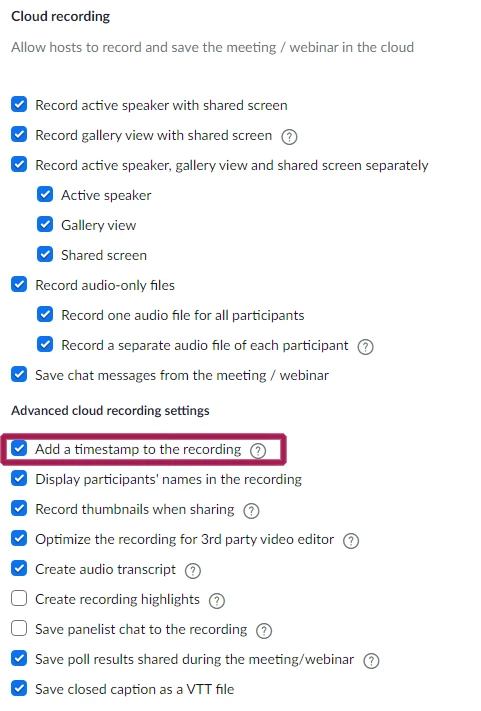
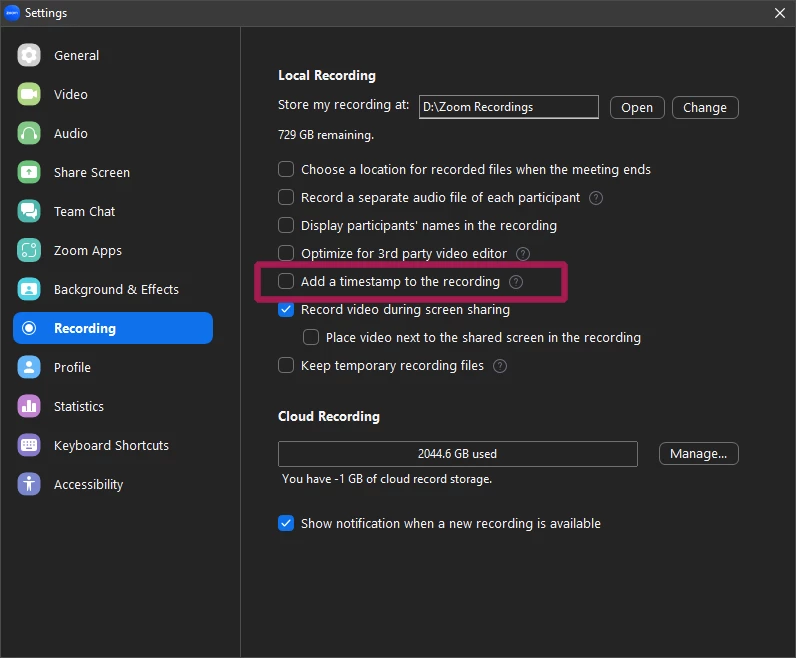
    Uncheck the box that is adding the Date/Time Stamp to your recordings.


    If Cloud Recording...


    If Local Recording...


    If you find this information helpful, please click on "Accept as Solution".

    If you have further questions, please reply, we're happy to help.

    10 replies

    ZoomTestKitchen
    Specialist
    Specialist
    Oct 12, 2022 4:47 AM UTC

    Uncheck the box that is adding the Date/Time Stamp to your recordings.


    If Cloud Recording...


    If Local Recording...


    If you find this information helpful, please click on "Accept as Solution".

    If you have further questions, please reply, we're happy to help.

    Translate
    Newcomer
    Jan 25, 2023 10:35 AM UTC

    Problem solved. Thank you

    Translate
    Newcomer
    Jun 11, 2023 9:09 AM UTC

    Thanks very clear!

    Translate
    Newcomer
    Jan 30, 2024 6:05 AM UTC

    How to disable the timestamp on the 2024 version of Zoom


    Translate
    Newcomer
    Jan 30, 2024 8:52 AM UTC

    I don't see a noticeable difference between the 2024 Zoom and older versions in this regard.


    Do you not see the settings screenshotted above in your settings?

    Translate
    Newcomer
    Jan 8, 2025 11:11 PM UTC

    I have "Add a timestamp to this recording" unchecked but it persists in adding these infernal timestamps. How to stop this?

    Translate
    Newcomer
    Apr 24, 2025 5:34 PM UTC

    The timestamps are still showing up on my cloud recordings

    I turned off zoom, restarted my computer and still there.  It is unchecked.  Any other options?

    Translate