

Explorer
Oct 20, 2023 3:12 PM UTC
Solved

Disable scribbling all over screen

I work with a group of kids who discovered a way to scribble all over the screen as I'm presenting, as well as all the emojis at their disposal. Is there a way to disable this scribbling feature? I don't mind interactive chatting (to a limit) but the drawings are a bit disruptive. Grateful if you can help out!

bstrelko
bstrelkoAnswer
Partner
Oct 20, 2023 5:06 PM UTC

Sounds like you want to disable annotation.

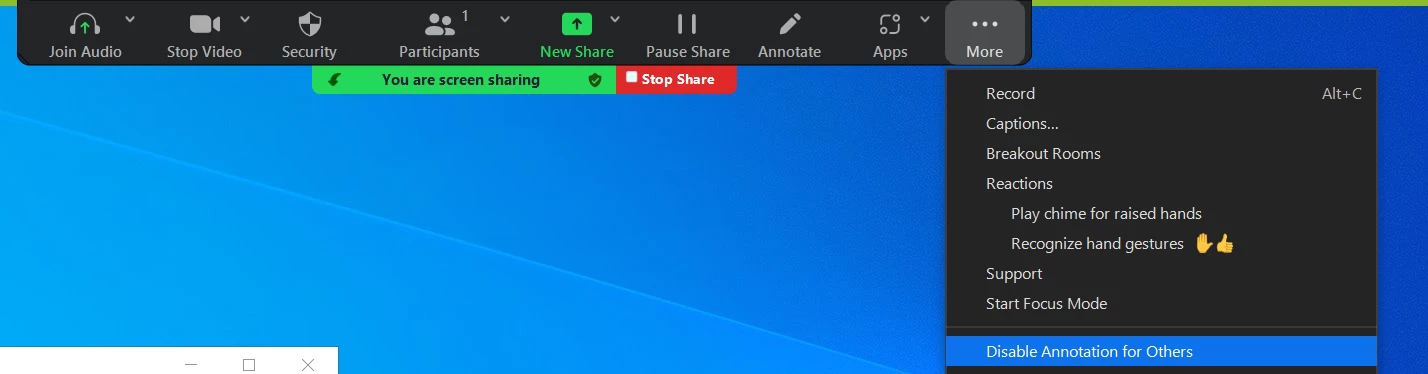
You can disable the annotation feature in your Zoom settings to prevent people from writing all over a screen share/whiteboard. To disable participant annotation, start your screen share / whiteboard session, then click on “More”, and click on “Disable annotation for others”.


You can also lock this down more broadly for the account via steps found here: https://support.zoom.us/hc/en-us/articles/4409894568845-Enabling-or-disabling-annotation-tools-for-meetings

2 replies

bstrelko
Partner
bstrelkoAnswer
Partner
Oct 20, 2023 5:06 PM UTC

Sounds like you want to disable annotation.

You can disable the annotation feature in your Zoom settings to prevent people from writing all over a screen share/whiteboard. To disable participant annotation, start your screen share / whiteboard session, then click on “More”, and click on “Disable annotation for others”.


You can also lock this down more broadly for the account via steps found here: https://support.zoom.us/hc/en-us/articles/4409894568845-Enabling-or-disabling-annotation-tools-for-meetings

Translate
DawnMAuthor
Explorer
Oct 20, 2023 5:26 PM UTC

Thank you!!!! I'll try that out for next time. 

Translate