Explorer
Dec 11, 2022 2:03 PM UTC
Solved

Delete a contact

How can i delete a contact? This contact is still displayed to me in the "Invite participants". Thanks!

    Ray_Harwood
    Partner
    Dec 11, 2022 7:03 PM UTC

    Hi, @cinziamonguzzi,


    Are you talking about the Invite in a Zoom Meeting or Webinar?  (Starting with Alt-I or clicking Invite on the Participant window)


    I think it only populates from the External, Company, Personal, and Imported contacts in your Zoom Contacts list - I don't think it includes the Cloud Contacts (which it grabs from your Outlook contacts).


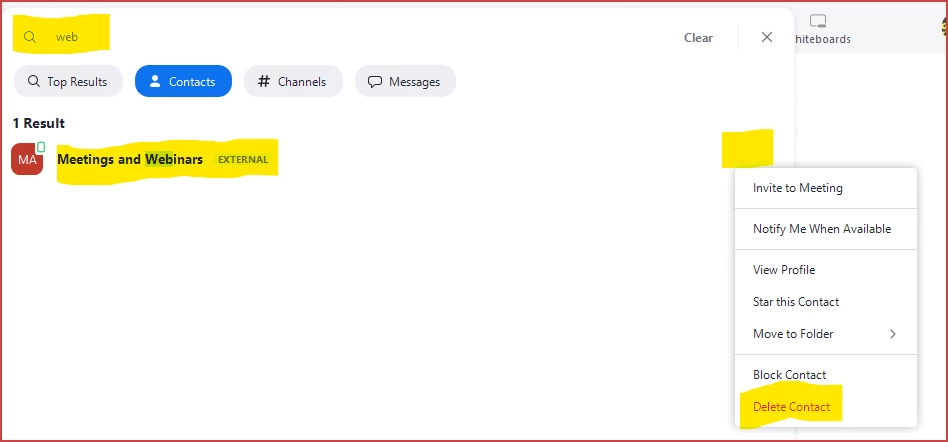
    The easiest way is to open your Zoom desktop client and click Control-F to search, enter part of the name, and their Contact entry should show up.  Just click the ... menu and click Delete -- poof!  Gone.


    2 replies

    Ray_Harwood
    Partner
    Partner
    Dec 11, 2022 7:03 PM UTC

    Hi, @cinziamonguzzi,


    Are you talking about the Invite in a Zoom Meeting or Webinar?  (Starting with Alt-I or clicking Invite on the Participant window)


    I think it only populates from the External, Company, Personal, and Imported contacts in your Zoom Contacts list - I don't think it includes the Cloud Contacts (which it grabs from your Outlook contacts).


    The easiest way is to open your Zoom desktop client and click Control-F to search, enter part of the name, and their Contact entry should show up.  Just click the ... menu and click Delete -- poof!  Gone.


    Translate
    Explorer
    Dec 11, 2022 7:11 PM UTC

    Dear Ray

    Thank you so much, it works. 😊 

    Translate