Explorer
Oct 3, 2024 4:10 PM UTC
Solved

Cannot share documents in Zoom Meeting

Hello.  I am on Version: 6.2.0 (1855) and when I try to share my screen or a document with my meeting participants, I get a black screen.  I can't see anything and neither can they.  The only thing I can share successfully, is the Whiteboard.  Any ideas?

YaBoiB
YaBoiBAnswer
Employee
Oct 3, 2024 10:49 PM UTC

Hello @sktnggtr, 


 If you would please. Read through this support document here and see if any of this applies to your situation. 

https://support.zoom.com/hc/en/article?id=zm_kb&sysparm_article=KB0060527

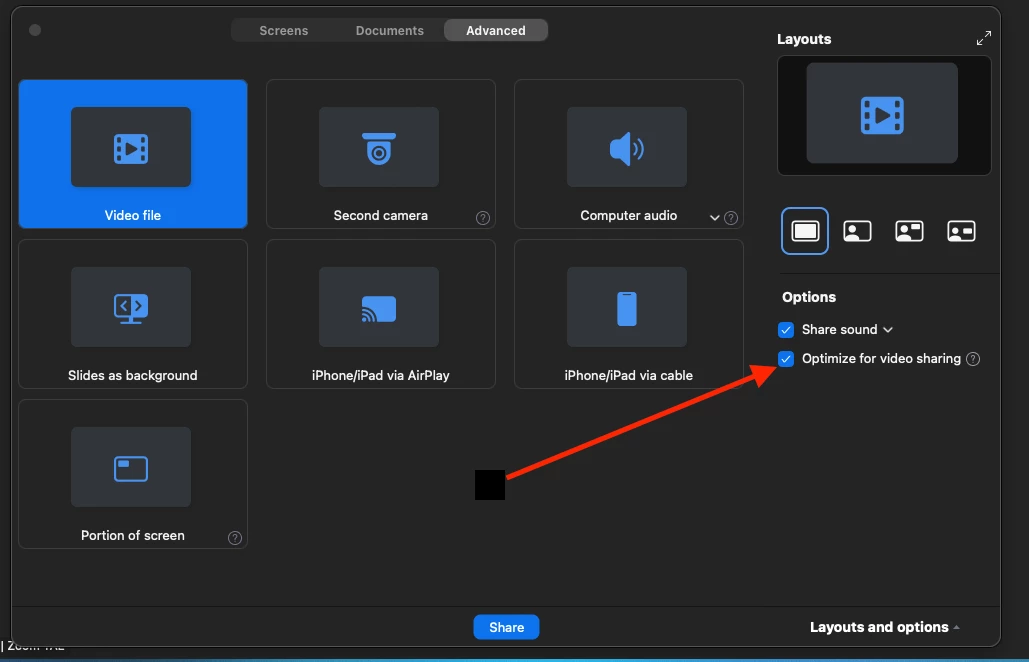
If not, check to see that you are not using "optimize for video sharing" to get to this setting, start a Zoom meeting> click on share screen button > click on the advanced tab > uncheck Optimize for video sharing. When this is checked (enabled) your Zoom screens will show up as black boxes. Another setting that you can enable if you so choose is "show my Zoom windows when screen sharing" this can also work with optimizing for video if it is enabled. I will share both settings screenshots below to help you find them. 


3 replies

YaBoiB
Employee
YaBoiBAnswer
Employee
Oct 3, 2024 10:49 PM UTC

Hello @sktnggtr, 


 If you would please. Read through this support document here and see if any of this applies to your situation. 

https://support.zoom.com/hc/en/article?id=zm_kb&sysparm_article=KB0060527

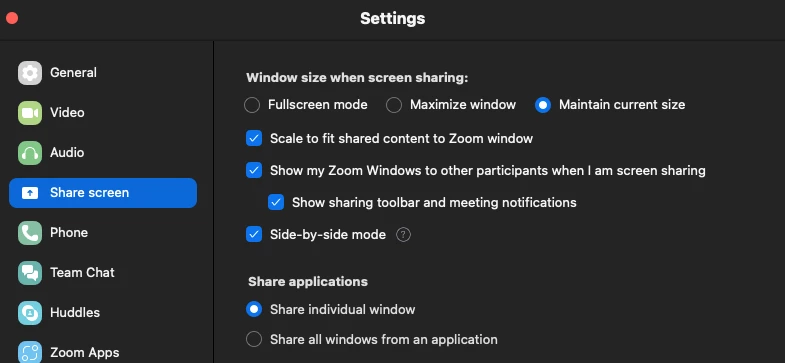
If not, check to see that you are not using "optimize for video sharing" to get to this setting, start a Zoom meeting> click on share screen button > click on the advanced tab > uncheck Optimize for video sharing. When this is checked (enabled) your Zoom screens will show up as black boxes. Another setting that you can enable if you so choose is "show my Zoom windows when screen sharing" this can also work with optimizing for video if it is enabled. I will share both settings screenshots below to help you find them. 


Translate
MGSR
Community Manager
Community Manager
Oct 11, 2024 8:41 PM UTC

Hi @sktnggtr!

Did you see the previous response from @YaBoiB?
If it has resolved your inquiry, please press Accept as Solution.

If you need further assistance, please let us know.

Have a great day!

Translate
MGSR
Community Manager
Community Manager
Oct 21, 2024 8:14 PM UTC

Hi @sktnggtr!

Given the time elapsed since we last heard from you, I've taken the liberty of marking the provided answer as the solution.

If you need further assistance, please let us know.

Have a fantastic day!

Translate


