

Explorer
Dec 4, 2022 5:52 PM UTC
Solved

Cannot schedule recurring meeting anmore without end date

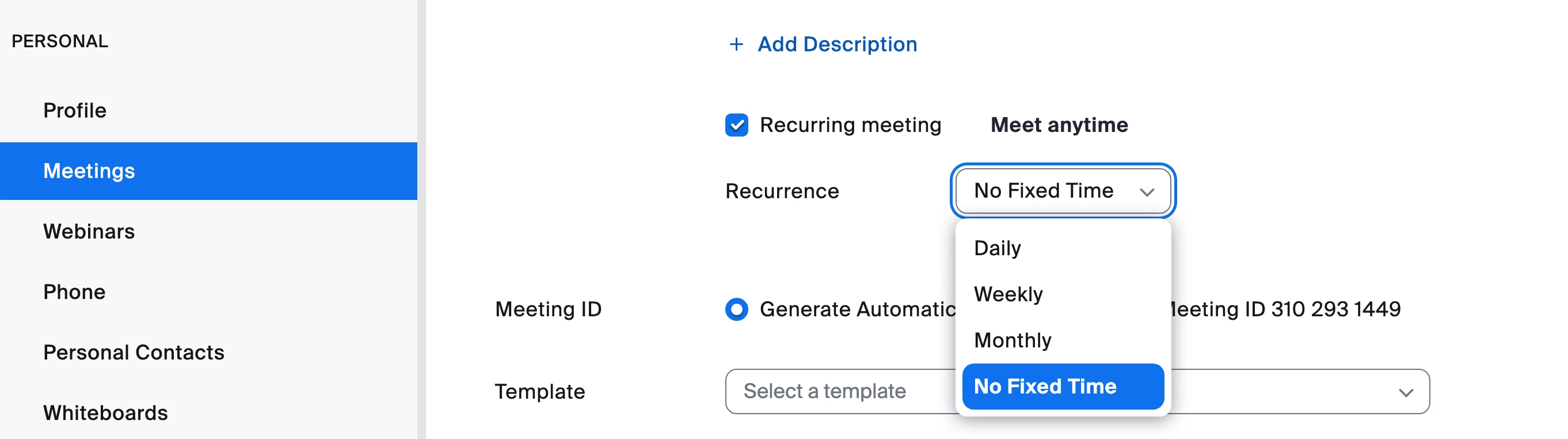
I used to schedule recurring meetings with no end date or number of occurrences. Now I am forced to choose and end date or a number of occurrences. If I choose for example "End date: 50 occurences", then all 50 meetings are listed on the left under upcoming meetings. That is totally annoying. How do I get around that? Also, it used to say "this is an ongoing meeting - meet anytime". I don't see that option anymore either. If I pick a certain time or date, can I still meet anytime?


Thanks for your help
    This topic has been closed for replies.
    Frank_TBAnswer
    Partner
    Apr 13, 2023 7:53 AM UTC

    Hello,


    I am on a Mac and I can find it. Here is a screenshot I just took. Ray is giving you correct information.


    Regards

    29 replies

    Newcomer
    Jul 13, 2023 11:58 PM UTC

    it's totally rubbish

    Translate
    Newcomer
    Aug 5, 2023 11:42 PM UTC

    this is out of date info.  You have to do into zoom on browser to do recurring meeting, it's pretty annoying IMO.  more time consuming.  It took me ages to figure it out too as the threads are sooo out of date


    you can file a complaint here 
    If you want a specific feature to be created or brought back, you can send a feature request for it. 
     
    In order to submit a Feature Request to our Product Team, please fill out a feedback form located at https://www.zoom.us/feed

    Translate
    Newcomer
    Aug 7, 2023 2:14 PM UTC

    I have formally reported this now, has anyone else who did got a response yet?

    Translate
    Newcomer
    Aug 8, 2023 10:05 PM UTC

    I haven't received a response, (I may have got a receipt of "feedback", can't remember)


    so that would be over 3 weeks ago...... 


    disappointing

    Translate