

Explorer
Aug 9, 2022 8:06 AM UTC
Solved

can't see the option to use powerpoint slides as a virtual background in Advanced Screen Sharing

Hi out there, 

I'm trying to use Powerpoint slides as a virtual background for a presentation bu can't see the option to allow me to do that in Advanced Screen Sharing.

I've downloaded the lastest desktop version, and checked my web profile and the desktop settings allow VB, and I thought I'd done it before, but now when I follow the instructions I can't see the option.


This is all I can see
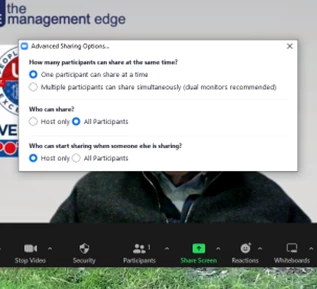
 

Can someone suggest what I'm doing wrong?  Thanks in advance


Tony
    kjhartmaAnswer
    Partner
    Aug 9, 2022 12:34 PM UTC

    Hi Tony,


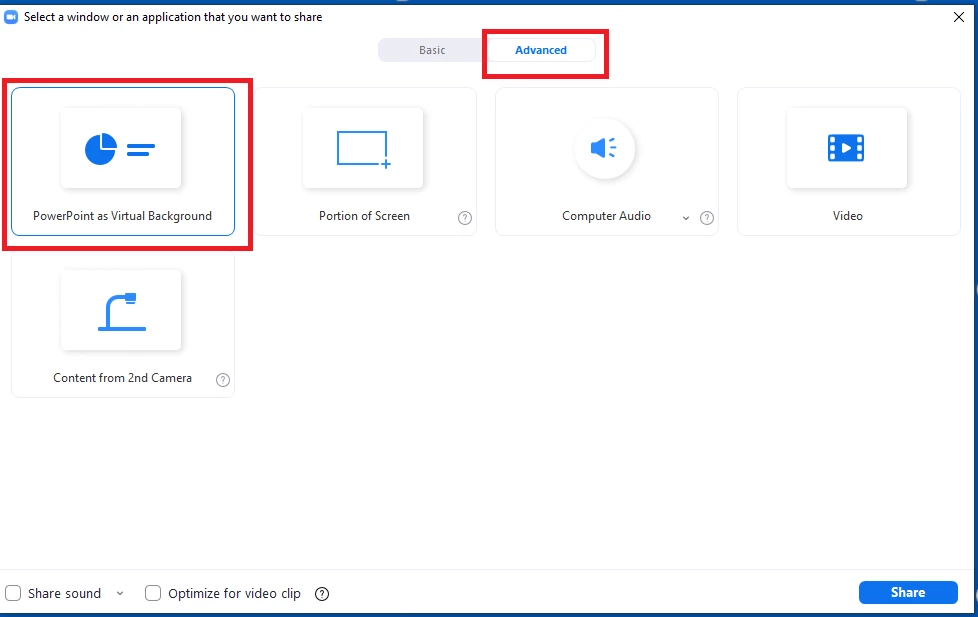
    Instead of clicking the little chevron next to the Share Screen button which I think you did here, click the Share Screen button itself.  From there, click the Advanced Button across the top, and then the option for PowerPoint as a Virtual Background.  Zoom will have you open a file, and you should be good to go after that.


    Here's some Zoom links as well.


    https://support.zoom.us/hc/en-us/articles/360046912351-Sharing-slides-as-a-Virtual-Background


    https://www.youtube.com/watch?v=5IfdpfKBEKw


    Thank You.

    Kevin


    6 replies

    Ohkawa
    Partner
    Partner
    Aug 9, 2022 12:26 PM UTC

    Hi, @TonyL 

    How about, Click Share Screen button > Advance >PowerPoint as Virtual Background, without click "^".


    Translate
    TonyLAuthor
    Explorer
    Aug 9, 2022 8:53 PM UTC

    Thank you Ohkawa, that did the trick!  Appreciate your help

    Translate
    kjhartmaAnswer
    Partner
    Aug 9, 2022 12:34 PM UTC

    Hi Tony,


    Instead of clicking the little chevron next to the Share Screen button which I think you did here, click the Share Screen button itself.  From there, click the Advanced Button across the top, and then the option for PowerPoint as a Virtual Background.  Zoom will have you open a file, and you should be good to go after that.


    Here's some Zoom links as well.


    https://support.zoom.us/hc/en-us/articles/360046912351-Sharing-slides-as-a-Virtual-Background


    https://www.youtube.com/watch?v=5IfdpfKBEKw


    Thank You.

    Kevin


    Translate
    TonyLAuthor
    Explorer
    Aug 9, 2022 8:54 PM UTC

    Thanks Kevin, that did it -  I didn't interpret the instructions correctly


    Appreciate the help

    Translate
    Newcomer
    May 31, 2025 4:43 PM UTC

    But that button is not active

    Translate