Explorer
Feb 17, 2023 12:36 PM UTC
Solved

Blurrred Background

The background is always slightly blurred, even though the "virtual background" and "blur" functions are turned off. I have tested 5 different cameras. With all of them I have the slightly blurred background.

    TomO
    TomOAnswer
    Employee
    Feb 17, 2023 6:58 PM UTC

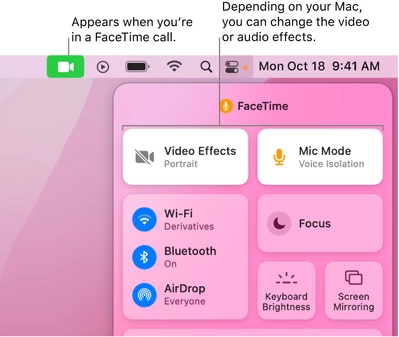
    On the new versions of MacOS, Apple has added a new Video Effects (Change video effects for FaceTime calls on Mac ). Try to turn off the Video Effects mode while using Zoom. The blurred background effect should then be removed.


    If this resolves your issue please mark this reply as an accepted solution.

    2 replies

    TomO
    Employee
    TomOAnswer
    Employee
    Feb 17, 2023 6:58 PM UTC

    On the new versions of MacOS, Apple has added a new Video Effects (Change video effects for FaceTime calls on Mac ). Try to turn off the Video Effects mode while using Zoom. The blurred background effect should then be removed.


    If this resolves your issue please mark this reply as an accepted solution.

    Translate
    co19Author
    Explorer
    Feb 17, 2023 8:37 PM UTC

    Thank you, TomO! That solved my problem perfectly!
    A super fast and helpful hint with a perfect description!

    Translate