Explorer
Mar 22, 2022 12:20 PM UTC
Solved

Blurred background

My iPad Zoom background is blurred even the virtual background is selected “None”.

I’ve tried to log out and also delete & reinstalled the Zoom but the background is still blurred.  

I didn’t change the setting.  Please help !

    TomO
    TomOAnswer
    Employee
    Mar 22, 2022 3:45 PM UTC

    Hello,

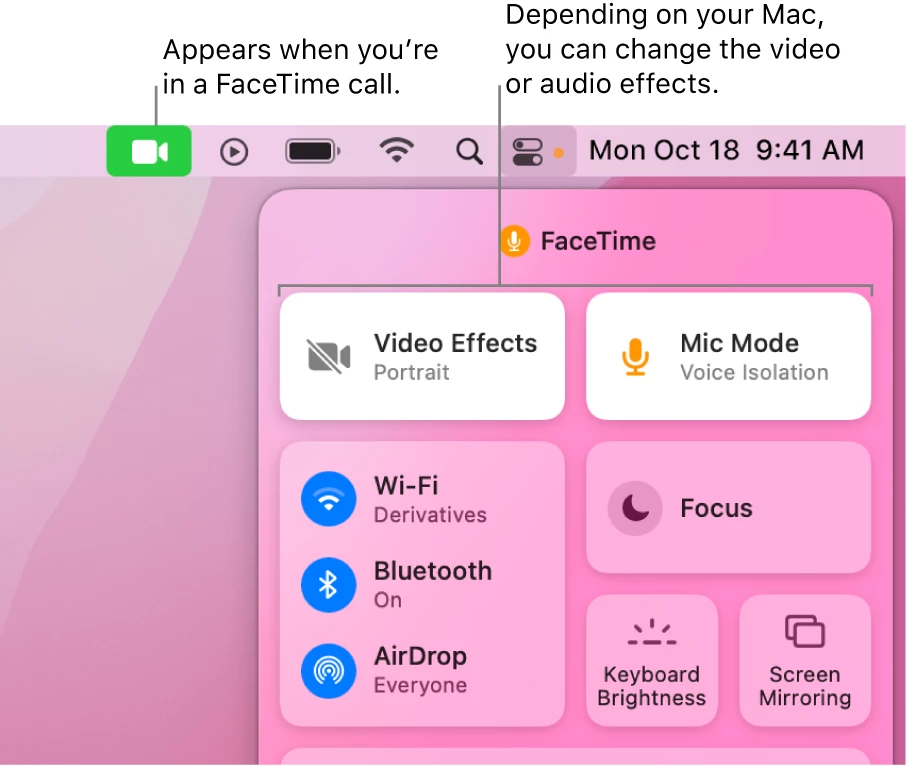
     On the new versions of MacOS, Apple has added a new Video Effects (Change video effects for FaceTime calls on Mac ). Try to turn off the Video Effects mode while using Zoom. The blurred background effect should then be removed.


    If this resolves your issue please mark this reply as an accepted solution.


    7 replies

    TomO
    Employee
    TomOAnswer
    Employee
    Mar 22, 2022 3:45 PM UTC

    Hello,

     On the new versions of MacOS, Apple has added a new Video Effects (Change video effects for FaceTime calls on Mac ). Try to turn off the Video Effects mode while using Zoom. The blurred background effect should then be removed.


    If this resolves your issue please mark this reply as an accepted solution.


    Translate
    ErikosAuthor
    Explorer
    Mar 23, 2022 2:36 AM UTC

    Thank you so much TomO! 

    Translate
    Newcomer
    Sep 21, 2022 8:46 AM UTC

    thankssssssss a lot buddy TomO, you just saved my life man 


    come to India I will show you Tajmahal for free 

    Translate
    Newcomer
    Nov 20, 2022 11:53 AM UTC

    Thank you so much for this solution.  We have a logi ConferenceCam which was unusable because of this setting; and it is now fixed!!  Thankyou!!

    Translate
    Newcomer
    Apr 14, 2023 5:16 PM UTC

    Please help - I'm using Zoom on Windows 11 and I still have this issue (constant blurred background).  I do not see anywhere where one can "turn off video effects."  I have my NONE highlighted and selected on virtual background.  Is there somewhere else where I can turn off/disable all video effects?  I find it nowhere.  My background remains blurred and it's annoying because I go in and out of focus during my entire meeting.  Help, thank you!

    Translate
    Newcomer
    Apr 26, 2024 5:04 PM UTC

    I am have the same problem.   My background is always blurred.

    Translate
    Newcomer
    Apr 26, 2024 6:15 PM UTC

    I am using a PC (Lenovo laptop).  So the Community Champion's suggestion doesn't work for me.  BUT... I did find a solution, and it's a weird one:  plug in an external video cam and the problem goes away.  WHY??  No idea.  But that was the only fix.  So strange, unexplainable.  Give it a try.  Nothing else worked, and nobody could help me.

    Translate