

Newcomer
Nov 23, 2023 12:35 AM UTC
Solved

Audio test not passing

I am using an Acer 3.  Windows 11.
I had no problems with Zoom, until last week.
When I do the audio test (with my headset, or the laptop speakers) I can hear no sound.

The microphone test passes with laptop mic and headset mic.
The funny thing is, the last two zoom meetings I was on, I could hear the participants and vice versa, despite the weird audio test problems.
What is going on?
KaneZhuAnswer
Employee
Nov 23, 2023 11:18 AM UTC

Some software and drivers will run their own audio processing for the meeting when they detect that Zoom is running, and then they filter out music, ringtones, notifications, and other sounds they consider as "noise".


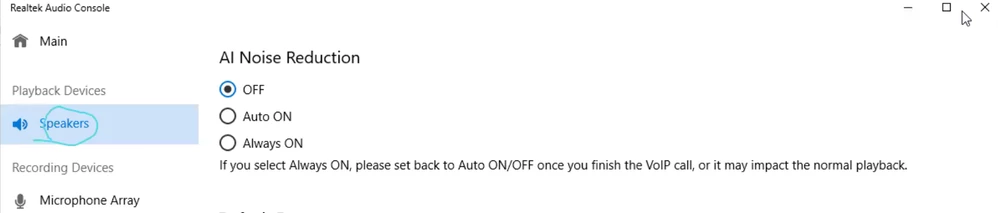
If "Realtek Audio Console" can be found in your App list, please try disabling “AI Noise Reduction” / “Noise Cancellation (voice call)” for speakers. This solved the same issue for many other users.

You can also try disabling other similar audio control software.


3 replies

KaneZhuAnswer
Employee
Nov 23, 2023 11:18 AM UTC

Some software and drivers will run their own audio processing for the meeting when they detect that Zoom is running, and then they filter out music, ringtones, notifications, and other sounds they consider as "noise".


If "Realtek Audio Console" can be found in your App list, please try disabling “AI Noise Reduction” / “Noise Cancellation (voice call)” for speakers. This solved the same issue for many other users.

You can also try disabling other similar audio control software.


Translate
Newcomer
Jan 8, 2025 2:29 AM UTC

This worked for me. Same problem, on the same manufacturer of laptop (Acer). Disabled the AI noise reduction in Realtek Audio Console. Now my audio test is working. Thank you!!

Translate
Explorer
Nov 27, 2023 6:58 AM UTC

I am having same problem, did this help fix the issue? my still not fixed.

Translate