Explorer
Aug 14, 2021 5:19 PM UTC
Solved

Audio Echo

Hello,


I am on a laptop when using Zoom.   Both my laptop mic and my external mic when I record .. after when viewing gives my audio an echo sound.   Unsure what to do to fix this.   Any help greatly appreciated.

    RN11_2Answer
    Community Manager
    Aug 18, 2021 2:27 PM UTC

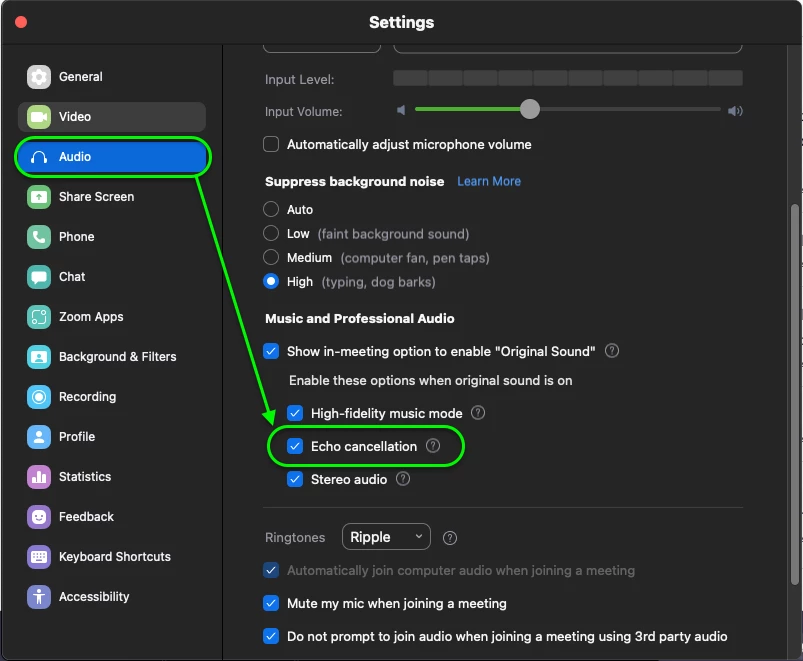
    Hey @amond  try enabling 'Echo Cancellation' within the Zoom desktop client settings.


    You could also try copying my audio settings to see if that helps! My internal and external microphones do not produce any echo. Alternatively, try reducing the volume of your speakers or microphone input. Hope this helps! 

    2 replies

    RN11_2Answer
    Community Manager
    Aug 18, 2021 2:27 PM UTC

    Hey @amond  try enabling 'Echo Cancellation' within the Zoom desktop client settings.


    You could also try copying my audio settings to see if that helps! My internal and external microphones do not produce any echo. Alternatively, try reducing the volume of your speakers or microphone input. Hope this helps! 

    Translate
    amondAuthor
    Explorer
    Oct 6, 2021 2:58 PM UTC

    already have it like that. 

    Translate