

Explorer
Aug 17, 2022 8:33 AM UTC
Solved

Allowing meetings participants to share their desktop by default

Hello,


when I start a meeting, the setting for sharing the desktop for the meeting participants is set to "Host only" by default.
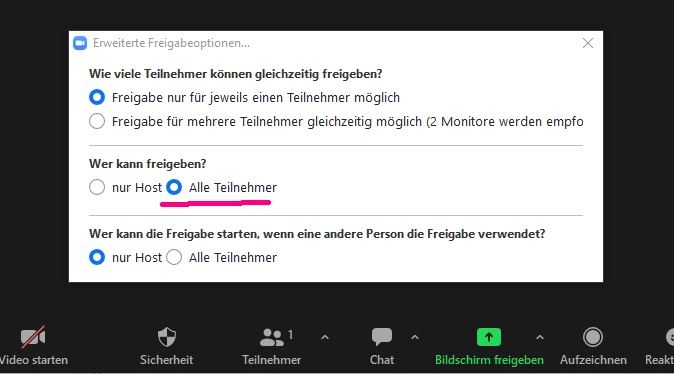
 

(The language on the screenshot in German, I hope you can identify the location of the dialog/setting.)


Is there a setting to allow participants to share their desktop by default, so I don't have to set it always manually (or in other words, I would like the underlined setting to be the default for every meeting I start)?


Thanks a lot for your help!


Kind regards,

Ben

    Bort
    BortAnswer
    Employee
    Aug 17, 2022 1:40 PM UTC

    Hallo @Lordran 

    Ja, es gibt eine Einstellung, wo Sie das Standardverhalten ändern können. Auf der Einstellungsseite können Sie die Bildschirmübertragung Einstellung finden. Dort haben Sie das gleiche Einstellungen als was Sie im Meeting finden können. Was Sie hier als Standard einstellen, wird auch das neue Standard im Meeting sein. 

    Auf Englisch für andere: 

    Yes, there is a setting where you can change the default behavior. On the Settings page you can find the Screen Sharing Settings. There you have the same settings as what you can find in the meeting. What you set here as the default will also be the new standard in the meeting.

    Hope that helps and please make sure to mark the solution as accepted if this information is what you needed.

    6 replies

    Bort
    Employee
    BortAnswer
    Employee
    Aug 17, 2022 1:40 PM UTC

    Hallo @Lordran 

    Ja, es gibt eine Einstellung, wo Sie das Standardverhalten ändern können. Auf der Einstellungsseite können Sie die Bildschirmübertragung Einstellung finden. Dort haben Sie das gleiche Einstellungen als was Sie im Meeting finden können. Was Sie hier als Standard einstellen, wird auch das neue Standard im Meeting sein. 

    Auf Englisch für andere: 

    Yes, there is a setting where you can change the default behavior. On the Settings page you can find the Screen Sharing Settings. There you have the same settings as what you can find in the meeting. What you set here as the default will also be the new standard in the meeting.

    Hope that helps and please make sure to mark the solution as accepted if this information is what you needed.

    Translate
    LordranAuthor
    Explorer
    Aug 17, 2022 7:09 PM UTC

    That‘s it - thanks a lot for your help!

    Translate
    Bort
    Employee
    Employee
    Aug 17, 2022 7:11 PM UTC

    Gerne! 

    Translate
    Newcomer
    Sep 29, 2022 5:26 PM UTC

    My settings do not show a "who can share" option.  Here are my screenshots:


    and after clicking "Advanced"


    How can I enable screen sharing for all participants by default when it isn't shown in my settings?


    Translate