Newcomer
Oct 7, 2025 12:15 AM UTC
Solved

adding profile image in a free account how to do this

With a free account, how do I set up the profile image? I do not see the steps to do this.  also, with the free account, how to set up a background image? thanks

Ray_Harwood
Partner
Oct 8, 2025 10:34 PM UTC

Welcome to the Zoom Community, @FILMEDITOR.


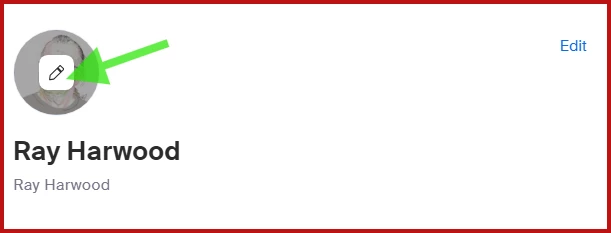
The Profile Image is uploaded by going to your profile https://zoom.us/profile and hovering over the image area above your Display Name.  Click the pencil icon and pick an image to upload.

The Background Image is set in the Desktop or Mobile app.  

  1. Go to Settings in the Zoom desktop or mobile app.
  2. Select Video & effects > Virtual backgrounds.
  3. Choose a default background or click the add icon to upload your own image or video.
  4. The background will be applied automatically.

If you don’t see this option, sign out and sign back in.


See this Support article for additional details:
https://support.zoom.com/hc/en/article?id=zm_kb&sysparm_article=KB0060387 

2 replies

Ray_Harwood
Partner
Partner
Oct 8, 2025 10:34 PM UTC

Welcome to the Zoom Community, @FILMEDITOR.


The Profile Image is uploaded by going to your profile https://zoom.us/profile and hovering over the image area above your Display Name.  Click the pencil icon and pick an image to upload.

The Background Image is set in the Desktop or Mobile app.  

  1. Go to Settings in the Zoom desktop or mobile app.
  2. Select Video & effects > Virtual backgrounds.
  3. Choose a default background or click the add icon to upload your own image or video.
  4. The background will be applied automatically.

If you don’t see this option, sign out and sign back in.


See this Support article for additional details:
https://support.zoom.com/hc/en/article?id=zm_kb&sysparm_article=KB0060387 

Translate
MGSR
Community Manager
Community Manager
Oct 14, 2025 5:10 PM UTC

Hi @FILMEDITOR! I wanted to let you know that I’ve marked @Ray_Harwood's response as the accepted solution, as I believe it answers your question. If you have any more questions or need further clarification, feel free to ask.

Translate