Newcomer
Nov 16, 2021 8:40 AM UTC
Solved

Why my camera is already opened before join a meeting?

When i join a meeting my camera found already open and i have no idea about it. Is there any solution to stop camera already?

    ChrisO
    ChrisOAnswer
    Specialist
    Nov 16, 2021 12:57 PM UTC

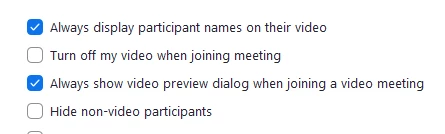
    If you are using the Zoom app, open the settings by clicking on your profile picture in the top right of the app. Under the video settings menu place a check box next to "Turn off my video when joining a meeting".


    1 reply

    ChrisO
    Specialist
    ChrisOAnswer
    Specialist
    Nov 16, 2021 12:57 PM UTC

    If you are using the Zoom app, open the settings by clicking on your profile picture in the top right of the app. Under the video settings menu place a check box next to "Turn off my video when joining a meeting".


    Translate