

Explorer
Aug 8, 2023 5:50 PM UTC
Solved

Screenshot Autohide

Did something change recently with the Team Chat 'Screenshot' button?  For users with one monitor, there doesn't seem to be a way to send a screenshot of what you're working on that isn't Zoom. Instead, when you click the screenshot button in Zoom the app remains up and the only thing you can clip is Zoom, rather than what's behind Zoom, if that make sense. And you can't minimize because the computer is in clipping mode.
gr_odAnswer
Newcomer
Aug 11, 2023 10:39 PM UTC

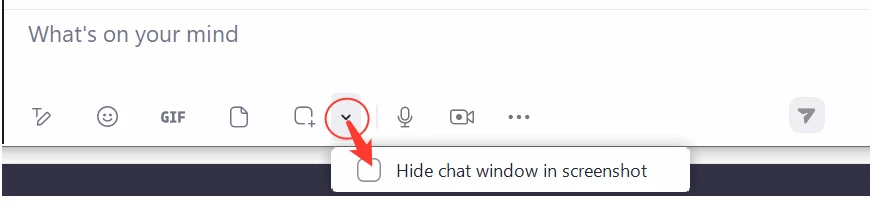
The setting to change this is right next to the screenshot button. Use the down arrow next to it and check the box there. 

2 replies

gr_odAnswer
Newcomer
Aug 11, 2023 10:39 PM UTC

The setting to change this is right next to the screenshot button. Use the down arrow next to it and check the box there. 

Translate
itdgriggsAuthor
Explorer
Aug 14, 2023 3:48 PM UTC

Perfect, thanks!

Translate