Explorer
Nov 29, 2021 3:58 PM UTC
Solved

Meeting identication

How can I identify who participate in the meeting after the meeting finished if I didn´t record it? 

    Peter_Uy
    Peter_UyAnswer
    Employee
    Nov 29, 2021 4:26 PM UTC

    Hello @Luciane1 ,


    I hope you had an awesome weekend!


    Regardless of the Zoom Meeting subscription you have and even if you did not record the meeting, you can still pull the participants who attended your meeting.


    You must have owner/ admin access to the Zoom Account, then go to the:

    Admin Section >> Reports >> select Active Host

    You can customize the date range (Maximum report duration [date range] equal or less than 1 Month and 

    Reports will show information for meetings that ended at least 15 minutes ago), then hit search.

    By clicking this link, it will take you to the report you're looking for: https://zoom.us/account/report/user


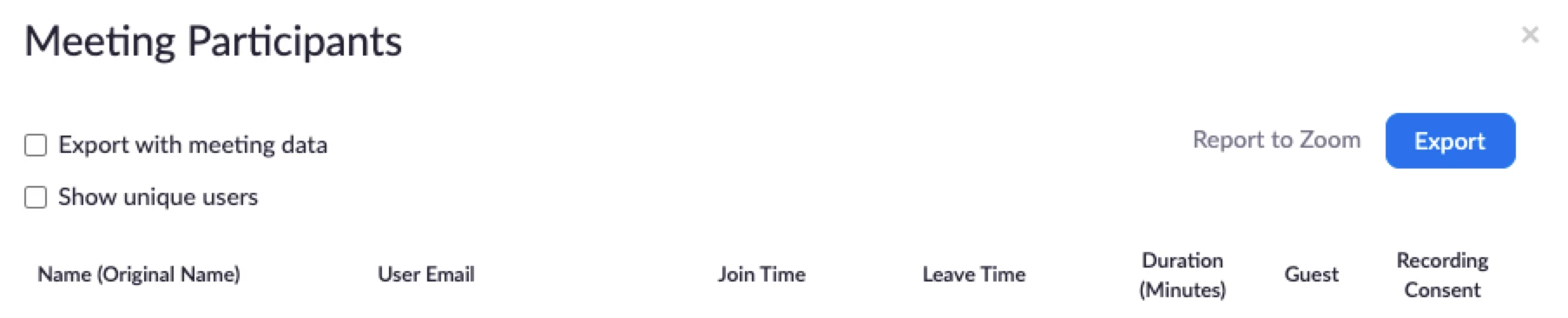
    It will list all the meetings you had in the past within the selected date range, locate the meeting you are looking for and click on the hyperlink (the one that shows the count of participants in that meeting), there will be a popup that will display all the names and other information (as shown on the image below) plus you can also export them as a .csv file.


    Please don't forget to hit like and accept the solution/ response provided if this answers/ resolves your question.


    Thank you and stay safe!

    4 replies

    Peter_Uy
    Employee
    Peter_UyAnswer
    Employee
    Nov 29, 2021 4:26 PM UTC

    Hello @Luciane1 ,


    I hope you had an awesome weekend!


    Regardless of the Zoom Meeting subscription you have and even if you did not record the meeting, you can still pull the participants who attended your meeting.


    You must have owner/ admin access to the Zoom Account, then go to the:

    Admin Section >> Reports >> select Active Host

    You can customize the date range (Maximum report duration [date range] equal or less than 1 Month and 

    Reports will show information for meetings that ended at least 15 minutes ago), then hit search.

    By clicking this link, it will take you to the report you're looking for: https://zoom.us/account/report/user


    It will list all the meetings you had in the past within the selected date range, locate the meeting you are looking for and click on the hyperlink (the one that shows the count of participants in that meeting), there will be a popup that will display all the names and other information (as shown on the image below) plus you can also export them as a .csv file.


    Please don't forget to hit like and accept the solution/ response provided if this answers/ resolves your question.


    Thank you and stay safe!

    Translate
    Luciane1Author
    Explorer
    Nov 29, 2021 4:55 PM UTC

    Thank you very much! I wish you beautiful week! Cheers!

    Translate
    Ekta_Mutyalwar
    Employee
    Employee
    Nov 29, 2021 4:28 PM UTC

    Hello Luciane,


    If you are using a Pro, Business, Enterprise, Education, or API Account, you can utilise our reporting feature to view participant details:


    As a member to see your own meeting details:


    Login to zoom.us --> Reports --> Usage Reports --> Usage


    Usage: The Usage report option allows you to view a list of meetings, participants, and meeting minutes for meetings you have hosted.


    As a Admin/Owner to see details of all the users in our account: 


    Login to zoom.us --> Account Management --> Reports --> Usage Reports --> Active Hosts 


    For more details, you can also refer:


    https://support.zoom.us/hc/en-us/articles/201363213-Getting-started-with-Zoom-reporting


    If you would like more information about this participants, you can also use our Zoom Dashboard feature as admin/owner of account: https://support.zoom.us/hc/en-us/articles/204654719-Getting-started-using-the-Zoom-Dashboard- 


    Prerequisites for using Zoom dashboard features: 


    • Business, Education or API Plan 
    • Admin Access

      Hope this helps!

    Translate
    Newcomer
    Feb 7, 2022 6:04 PM UTC

    Hi @Ekta_Mutyalwar , thanks very much for the insight.  I had a similar understanding that individual meeting hosts could pull attendee reports for meetings in which they are the host.  As the owner/admin, I can certainly see attendance reports from the admin console, but my individual users seem to be lacking the "reports" section under their Zoom profiles.  This used to be enabled for all users in our account, but perhaps it was removed/redesigned as part of Zoom's bolstering of its privacy/security protocols?


    Is there a way to re-enable this feature for hosts?  If so, I am at a loss for which setting to change.  If there is a different workflow to allow individual hosts to account for who joins their meetings, that would work as well.


    Thanks for the time and consideration!

    Translate